Your workflow is unique 👨💻 - tell us how you use Dropbox here.
sync
38 Topics
No option for "make online only" when I right click my files
I have a professional DropBox account and I'm working on a Mac, OS 12.5. I have several files that are sync'd locally that I would like to move off my hard drive and make online only. When I right-click on the folders, however, I'm not getting the option from the drop-down menu to make the files online only. Any suggestions? Thank you!Solved12KViews2likes56Comments
I've looked everywhere online for my selective sync settings, but I can't find them.
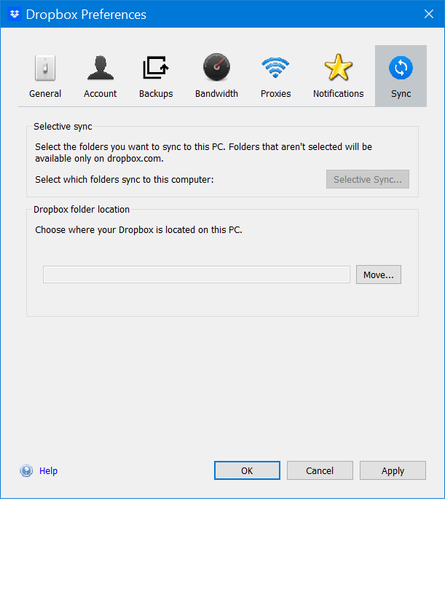
I have looked everywhere on my Dropbox.com account and cannot find sync anywhere. I have found preferences and there is nothing about sync there. I have a colleagues whose screen shows sync under this menu. I have been on Dropbox since 2008. I upgraded the desktop app but don't know if or how I can update the desktop application. Any suggestions? Could she possibly have a paid version if she has selective sync -- but even with the free version I should have sync shouldn't I so I can remove files I don't want to sync Her message: Across the menu bar at the top you should see a drop box icon. Click on it. [Note: this only opens my dropbox - I need to click my personal icon and then I get setting and preferences] Then you’ll see an option called settings or preferences. Click on it and you’ll see an option that says sync. [Note: I don't see sync option anywhere here] Click on that and look for an option that says ‘selective sync’ Here you can click only the folders you want.Solved8.5KViews0likes7Comments
Option: Make available offline no longer available in context menu
Hello, I have all my files online only, but when I need to work with them I usually right click the folder and click 'Make available offline' but that option is gone since the last big dropbox update. How do I get this back please? I can't work like this.Solved4.5KViews0likes21Comments
Missing sync option (smart sync)
Where do i actually find the **bleep** smart sync, I either have to download and then sync or went to the website to access the file. With all the youtube guide I watched none of the preferences option are the same to each other. I am using a Windows 10 Laptop if that mean anything.Solved4.2KViews0likes36Comments
How to deactivate smart sync
Hi, is there any way to completly deactivate the smart sync "feature"? Since that was introduced the dropbox service became really messy. I use selective sync a lot, now I have always I add new files activate for all new files to have them offline available. As I don't want to use smart sync at all and always have my files offline available I just want to deactivate that function completely but it seems that there is no setting in the settings. (And what is this annoying "Labels" thing, is it even a problem to get a forum running without annoying ppl with useless features?)3.3KViews1like19Comments
How to disable selective sync to keep all files locally ?
Hi, I'm looking for the option to disable the selective sync. I want to keep all the files locally, at all times. I don't find the option to disable selective sync. In the sync settings, I only see two options: 1) Selective sync: Hide folders you don't want to see on this Mac. Hidden folders will be available on dropbox.com 2) Dropbox folder location: This version of macOS requires Dropbox folders to be stored here: /Users/.../Library/CloudStorage/Dropbox Edit: I'm on macOS 13.1 and Dropbox v165.4.43003.1KViews0likes10Comments
Can you force Dropbox to use more bandwidth?
Curious if there's a way anyone has found to get Dropbox to use more of your available bandwidth when syncing files. I have gig speed internet, but consistently the fastest Dropbox syncing speeds I can get are max 10-20 mb/s. I've tested my internet speeds with a number of other methods, and found my overall speeds to consistently be 500-1,000 mb/s at the same time that Dropbox will tell me it's syncing at around 10-20 mb/s. Sometimes Dropbox is even at 1 mb/s or less. I don't have any bandwidth limit set in the Dropbox preferences. It's set to "Don't limit" for both downloads and uploads. I work with Dropbox as a remote server and am constantly syncing files all day... so I'm just trying to get files to sync faster, and I'd love for Dropbox to be able to use more of my available bandwidth. Even if it could use a little bit more of my available bandwidth, that would be a huge time saver. It would help me not have to just wait for hours at a time sometimes when Dropbox won't let me do anything else while files sync. Anyone come across this, or have any ideas?Solved2.7KViews0likes2Comments
Persistent Dropbox pop-up notifications about files being online-only on Win11
My Win11 Dropbox continues to hammer me with Popups that say: "Sync Status These files are online-only. To Open them, first move them into your Drop box folder." I traced some of these files to my \Dropbox\dropbox.cache folder. I deleted it. The Popups just kept Popping. I deleted Dropbox App on Win11 and Reinstalled it. That did not help. The Popups just kept Popping. I cloned my Dropbox folder to my OneDrive ... it continues always say it is uploading 89 files. It makes no progress uploading the 89 Files. The Dropbox Popups Just Keep Popping. Is there a fix? Thank you ....2.6KViews1like13CommentsMissing options in sync tab of my desktop app
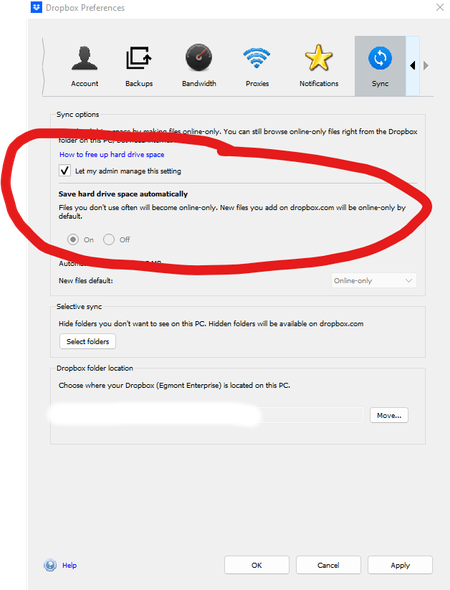
Hi I have Windows 10 Enterprise installed on my computer and newer version of Dropbox. Following options are not available in my dropbox preferences while 2 of my colleagues have it. I already tried to uninstall/install Dropbox and have already up to date windows but still not showing. Can someone help? Regards HanifSolved2.5KViews0likes14CommentsSince the update to v154.4.5363, offline files are not storing locally when requested
Hello, like many people, I got the update that added the individual user folders and changed all the file paths in Dropbox as a result. It looks like shortcut aliases where made to help all the apps that had obsolete paths in Recent Files and stuff, but it has seriously messed Windows File Explorer up in terms of staying fresh. More importantly, when I select "Make Available Offline" (what used to be "Store Locally") the Dropbox app is usually but not always ignoring my request. In previous versions, the download happened immediately. Now, most of the time (but not always!) I have to kill all Dropbox tasks and services and restart. Then it syncs. The Taskbar Icon says DropBox is up-to-date before the restart.Solved2.4KViews0likes10Comments