We're making some changes to the Dropbox Community 👩💻 - Find out more here.
two factor authentication
25 Topics
Lost 2FA access and no backup codes or phone number - Am I going to lose my account of 12+ years?
Do you have access to the email linked to the account? Yes Are there any devices connected to your Dropbox account? None Question or Issue I tried to update my 2fa last year and apparently I did it wrong, now my new 2FA codes don't work for my dropbox account. I don't have any files synced with dropbox on any device so they're all in the cloud. I contacted support and was told that without 2FA, backup code or a backup phone number(I don't think I have a phone # linked to my account) that I will lose my account access. Just wondering if anyone has any experience with this? I really would like to keep my dropbox account because I have files in there since my college days.Solved116Views0likes5Comments
Cannot log in to my account as I'm not getting the verification code
Dropbox Plan Basic Are you a Team Member or Admin? N/a Do you have access to the email linked to the account? Yes Are there any devices connected to your Dropbox account? Laptop Question or Issue I am unable to log in to my account, as it is asking for a 2 step verification code (which it never used to). It states that it has sent me a code by email, but it is not arriving. I have looked in all email folders including spam and junk91Views0likes2Comments
Two-factor authentication methods used on my account are no longer accessible and I can't sign in
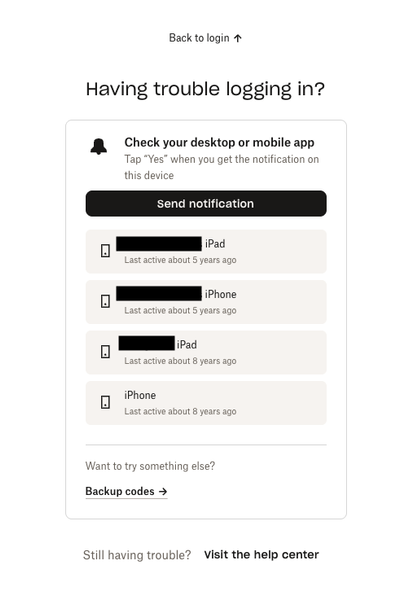
Dropbox Plan Unsure Are you a Team Member or Admin? Admin Do you have access to the email linked to the account? Yes Question or Issue AT A CROSSROADS with Logging Into My Account. I have been a Dropbox accountholder for over a decade. I have never had an issue logging into my account up until now. I originally established my Dropbox account to store important life artifacts, like old photos of our family, etc. And, thus from time to time over the years when I had the space in a busy life to log in I would update what I wanted to continue to add to the story of our life's treasures. I have been attempting to log into my account over the past week with no success because the two-factor authentication methods are no longer accessible to me. The devices on file are no longer owned. The phone number on my account's file I no longer have access to (my employer issued me that number and I no longer work there). And, the backup codes it is suggesting I access I do not have. I have been going back-and-forth with email support for days now and my experience is the email support team is not comprehending this and keeps repeating their support recommendations, thus I am finding myself repeating the situation now 3 times. I am no closer to getting help with a manual account recovery option. I even offered to provide additional account verification identification. I really need additional escalation and help with this matter. I respect the role in protecting our data. Equally, I am having a difficult time respecting the support experience for a long-standing customer who has spent hours attempting to get adequate assistance that resolves an issue, versus perpetuating the inability to use a service I have invested years into, and I am still currently paying for. Below is the screenshot showing the devices linked to my account that DropBox has on record for me. You will find these haven't been active in the past 5 - 8 years.92Views0likes2Comments
Having issues accessing my 2fa code. What can I do to be able to sign into my account?
for some reasons i havestopped using dropbox for a year now i need to regain access on my account but i can not access authenticator app generating 2fa codes for the account now is it possible to verificate from email instead of the 2fa code as i no longer have access to it and the account is important to me63Views0likes1Comment
My 2FA authenticator app has been deleted. How can I recover access to my old account?
I stopped using Dropbox about a year ago, and when I recently tried to log back in, it asked for a 2FA code from an authenticator app that I had already deleted. Is there any way for me to recover access to my old account?Solved207Views1like4Comments
Can I log in to my account without my authenticator app or backup codes?
Question or Issue I have 2 dropbox accounts. For my second drop box account (where I have a plus plan), I am not able to log in as I am in a loop of verifications that I am unable to do. I do not have the authenticator app, and I don't have my backup codes. Is there no other way to log in? When I contact support they tell me to do a bunch of things that don't exist when you aren't able to log in. Are my files lost? To make matters worse, I pay for drop box and I can't get into my account. There has to be a way to help people who lost their backup codes and whose phone number doesn't seem to be in their profile. I tried to log in on desktop app, phone app etc., but doesn't work as I'm stuck in this loop! Help! Betina162Views0likes2Comments
Phone verification issue - no backup codes and no connected devices
java, did you get an answer to your issue. can you login to dropbox eventually? Ihave the same phone verification problem. I don’t have backup code, no connected device. Tried very thing including norecognido mode. Still can‘t login……96Views1like1CommentMy password was changed by someone else. What are the next steps?
Ok, here is my story - looking for info and/or advice. My Xfinity email account has been hacked several times over the past year. The last time (5 months ago) and yesterday, the hackers were able to use the email account to gain access to my Dropbox account. Last time, I enabled 2-factor security in Dropbox with both a mobile authenticator app and physical security keys. Yesterday, my Dropbox password was hacked and changed... I knew it was happening because I was aware that my email was being hacked and was literally dealing with it as it was happening. I realized that my Dropbox password was changed and I immediately changed it again. I WAS asked for 2-factor verification using the mobile app. I might have been asked for the security key, too - I don't remember exactly as I was dealing with several things at once. Point is that I WAS asked for something 2-factor to authenticate and allow the password change to occur. What I find troubling is that "they" were able to change the password/gain access to my account with 2-factor in place... Isn't that the whole point of having 2-factor? A physical "key" which you must be in possession of in order to make certain changes to the account??? I chatted with Luis in Customer Support - absolutely NO HELP WHATSOEVER - basically stated "no idea how that happened" and said that the problem was probably my computer's security or that I had used public wifi... Public wifi never happened. I pressed him to escalate the case or forward it to a security team (does that even exist??). He asked to move the chat to email - I suspect as a way to get rid of me.. Any info / advice would be appreciated. Thanks for your time.Solved15KViews1like5Comments