Your workflow is unique 👨💻 - tell us how you use Dropbox here.
Forum Discussion

srndreambox
2 years agoHelpful | Level 6
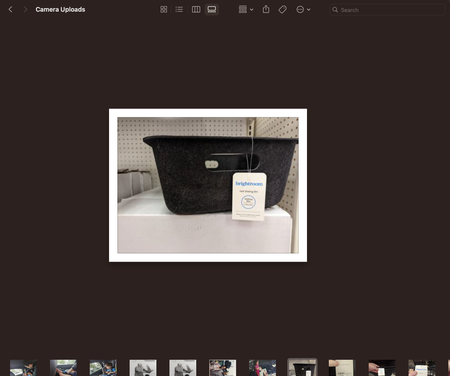
Camera uploads show small preview and white border in Finder
The images inside my "Camera Uploads" folder show with a white border and fixed size in Mac Finder. Even in gallery view the images do not fill the screen like in other folders.
If I copy the s...

Jay Dropbox Community Moderator
2 years agoDropbox Community ModeratorHi srndreambox, thanks for bringing this to our attention.
Could you try quitting the Dropbox desktop application completely to see if the preview changes?
Is your Dropbox folder located in the new CloudStorage location on your Mac?
This will help me to assist further!

srndreambox
2 years agoHelpful | Level 6
Yes Dropbox folder moved to new CloudStorage location.
I've had the original for months; I only today realized it was Dropbox and only that folder.
I've force restart Finder many times.
I've restarted computer many times.
If I copy an image into that folder locally the problem does not occur on those files.
Thanks,
Sam
I've had the original for months; I only today realized it was Dropbox and only that folder.
I've force restart Finder many times.
I've restarted computer many times.
If I copy an image into that folder locally the problem does not occur on those files.
Thanks,
Sam
- Jay2 years ago
Are the image files marked as local, available, or online-only?
- srndreambox2 years agoHelpful | Level 6
I'm not actually sure whether they're local or available (or what the difference is), but should not be online-only. Screenshot below which I hope tells you better than it tells me.
I have clicked on the containing folder and selected "Make available offline" and that folder has both a green check and a cloud icon. The pictures all have both a green check and a cloud icon. They show in finder as having the correct size (as opposed to zero bytes which is what I'm used to seeing for online-only files). They don't show exif data though.
Thanks!
Sam
- Jay2 years ago
It should just have a green icon if it's local, otherwise there's an issue somewhere. Could you try marking the file as online-only, and then available offline, to see if this helps?
Does the file preview normally on the Dropbox site? Can you try opening the image in another image viewer on your machine to see if it loads properly from the camera uploads folder?
About View, Download, and Export

Get support with viewing, downloading, and exporting files and folders from your Dropbox account.
The Dropbox Community team is active from Monday to Friday. We try to respond to you as soon as we can, usually within 2 hours.
If you need more help you can view your support options (expected response time for an email or ticket is 24 hours), or contact us on X, Facebook or Instagram.
For more info on available support options for your Dropbox plan, see this article.
If you found the answer to your question in this Community thread, please 'like' the post to say thanks and to let us know it was useful!


