Your workflow is unique 👨💻 - tell us how you use Dropbox here.
Forum Discussion

CChesnutt
2 years agoCollaborator | Level 8
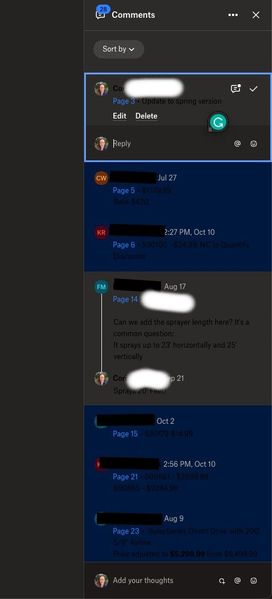
Dark Mode on Web suddenly, and I can't read comments.
I suddenly have a "Dark Mode" view on DropBox for web. While I think it's great this is finally available, I am now unable to read comments on files because there is black text on dark gray backgroun...

Megan Dropbox Community Moderator
2 years agoDropbox Community ModeratorHi CChesnutt, let's jump right into this!
As a first step, would you mind clarifying if you use a dark mode on your device, or with Chrome?
Let me know more, and we'll take it from there!
 CChesnutt2 years agoCollaborator | Level 8
Thanks, Megan. I use Dark Mode wherever I can. I had OSX set to Dark (I have had it this way for years). It appears that Chome uses the OSX settings (Light, Dark, or Auto). I could not find a setting ONLY for Chrome. But in the past, this has not been a problem as DropBox was always "light", even when I had my OSX settings set to Dark Mode. This is something that changed since last week, I now view "dark mode" in DropBox and I can't read the comments unless I change the entire settings of my operating system to Light mode.
About View, Download, and Export

Get support with viewing, downloading, and exporting files and folders from your Dropbox account.
The Dropbox Community team is active from Monday to Friday. We try to respond to you as soon as we can, usually within 2 hours.
If you need more help you can view your support options (expected response time for an email or ticket is 24 hours), or contact us on X, Facebook or Instagram.
For more info on available support options for your Dropbox plan, see this article.
If you found the answer to your question in this Community thread, please 'like' the post to say thanks and to let us know it was useful!


