Your workflow is unique 👨💻 - tell us how you use Dropbox here.
Forum Discussion

kmccauley
2 years agoExplorer | Level 4
Dropbox is no longer capable of downloading files automatically.
The update to V175.4.5569 has broken Dropbox for me (MaxOS Ventura). My workflow is to put dozens of GB of raw images onto dropbox, and then edit and organize them on one of two different comput...

Walter Dropbox Community Moderator
2 years agoDropbox Community ModeratorHi there kmccauley, sorry to hear you're having issues with this.
It seems that you updated to the new desktop app for Mac OS - you can have a look at this Help Center article about the expected changes.
As for the syncing issue, could you clarify how long it's been since the app stuck at syncing?
Have you rebooted your computer at all since you noticed this?
Keep us posted!
 kmccauley2 years agoExplorer | Level 4
The issues started after Dropbox moved to ~/Library/CloudStorage in the update last week.
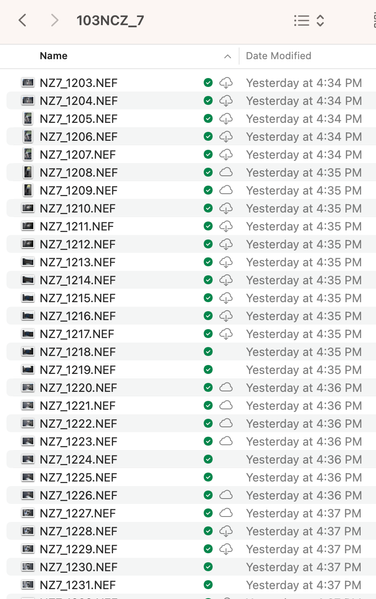
My workflow is to use Dropbox like a server — I upload 20-50 GB of images onto one device in a Dropbox folder, and previously, they would be available on the other device within a few hours without much intervention from me. The syncing issue now is that Dropbox won't download my files locally without a lot of babysitting and monitoring the device. And on top of that, I can no longer see the status of how much is left to download, or if it's even still downloading.
It will eventually do it, but it no longer will download large batches of files automatically if I just leave it. Showing me an icon for a fake file that isn't downloaded (and isn't downloading) is not helpful.
I have rebooted several times.
- Hannah2 years ago
Sorry to jump in here, kmccauley.
Can you please click on the Dropbox icon in your menu bar, then on your initials/profile pic, then on "preferences" and then on "sync" and send us a screenshot of what you see there?
- kmccauley2 years agoExplorer | Level 4
Sure:

About View, Download, and Export

Get support with viewing, downloading, and exporting files and folders from your Dropbox account.
The Dropbox Community team is active from Monday to Friday. We try to respond to you as soon as we can, usually within 2 hours.
If you need more help you can view your support options (expected response time for an email or ticket is 24 hours), or contact us on X, Facebook or Instagram.
For more info on available support options for your Dropbox plan, see this article.
If you found the answer to your question in this Community thread, please 'like' the post to say thanks and to let us know it was useful!


