Your workflow is unique 👨💻 - tell us how you use Dropbox here.
Forum Discussion

pk_nyc
3 years agoHelpful | Level 6
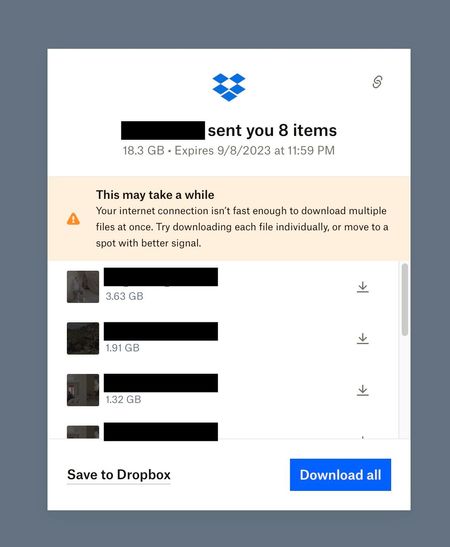
Fix incorrect internet speed warning when downloading large Dropbox Transfers
I'm not sure if it's a lot of files, or a large size that triggers this warning. The warning claims the internet connection is not fast enough, and also suggests moving to spot with better signal, er...

Nancy Dropbox Community Moderator
3 years agoDropbox Community ModeratorThanks for the additional info, pk_nyc!
I’ve passed your comments as feedback to the relevant team, so that they’re aware of this.
If you need something else though, please let me know.
pk_nyc
3 years agoHelpful | Level 6
Hey - just another bit of info here.
Just got a report of this issue on a transfer that contains only a SINGLE large file. You can see the warning message still says "multiple files", so who knows what it's attempting to actually warn about, but it does seem to be triggered by a large file size alone.
The person downloading this file is on a commercial dual gigabit connection in midtown Manhattan, state of the art facility, specialized in large internet transfers, and definitely definitely no reason they would have trouble downloading.
- Walter3 years ago
Hey pk_nyc, sorry to jump in here, but could you ask them to clear their browser's cache or try another one?
Also, have they tried rebooting their computer and router at all since they got this message?
If it's not too much to ask, could you also clarify the app's extension? Is it perhaps an archive/zipped file or a package/container file?

About View, Download, and Export

Get support with viewing, downloading, and exporting files and folders from your Dropbox account.
The Dropbox Community team is active from Monday to Friday. We try to respond to you as soon as we can, usually within 2 hours.
If you need more help you can view your support options (expected response time for an email or ticket is 24 hours), or contact us on X, Facebook or Instagram.
For more info on available support options for your Dropbox plan, see this article.
If you found the answer to your question in this Community thread, please 'like' the post to say thanks and to let us know it was useful!


