Your workflow is unique 👨💻 - tell us how you use Dropbox here.
Forum Discussion

Markus S.
2 years agoHelpful | Level 6
I don't like the new video player design
I use Dropbox a lot of years now and liked most of the changes and new functions before. But absolutly not this time. Since today Dropbox informes when opening a video with the player that a new use...

derrickyee Dropbox Product Manager
2 years agoDropbox Product Manager
Thank you so much for your feedback! I wanted to potentially address a couple notes on some functionality that was moved around.
File Info: It has now been moved to under the File Menu where you can now click on "info" from there"
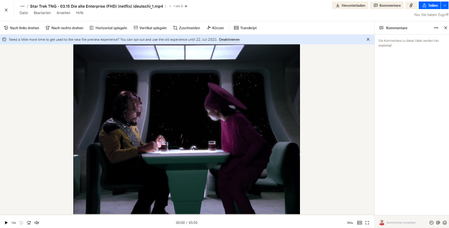
Video Controls: they have now been moved to the bottom of the page. You can still access features, such as frame by frame, skip 10 seconds, and fullscreen from there. The fullscreen specifically is now on the bottom right of the page with the same fullscreen box logo
I've attached a screenshot on where they now live! Let me know if you're able to find it.
- Markus S.2 years agoHelpful | Level 6
Since the last changes of the dropbox web interface, the file preview (especially at videos) and the file explorer I see more and more things that worked perfect in the past so that you could use and work with it in an effective way.
But now there a more and more things that you either changed on purpose so users can't work with it effectively anymore. Or the developers and the support didn't test it effectively and in different ways.
These are some mistakes I recognized the past days:- The file preview still isn't fix (https://www.dropboxforum.com/t5/View-download-and-export/I-don-t-like-the-new-video-player-design/m-p/698911), so there's still a "border" at every side of the played video. Annoyes me every time I watch a video, especially when it's full hd.
- When you open a folder, in the file / folder preview without searching there's still the additional info section on the right side so you can see the file date, size, document type, which folders it's in, the file thumbnail and you can add / change the tags.
But when you use a search, the info section is completely missed.
You could open the file for the additional information, but this takes additional steps / clicks, so more time. And in the file editing is no abilitly to change / edit the tags. As a workaround you now need to
* find which folder it's in
* open that folder
* manually scroll to that specific time and
* edit it without using the search inside the folde
But in folders with hundrets or thousands of files this takes a really long time and is really, really "time eating" and annoying. - When you want to move a file from one folder to another (inside a big folder structure with 5 to 10 folder levels and a lot subfolders inside a folder) the folder selection windows thakes minutes and minutes and nothing happens. So at the moment the web interface is nearly useless for that part.
- Inside a folder you can't add tags to files / the folder anymore in an effective way. Cause when the tag is selected, in the past the cursor was still in the tag field. Now it loses the "focus" and switched back to the file selection section. So that way you don't add a second, third tag, but you switch to another file, beginning with the typed letter. So it's possible you don't regocnize you're using another file and edit the tags at the wrong file. Happened to me two times until I saw that bug.
- At some files you don't anymore when the file was changed / uploaded last time.
- When the information when the file was changed / uploaded is seen, the date is interpreted wrong. For example, the file in the screenshot was uploaded at 11th february 2022 (11.02.2022 in german writing), so about 18 months before.
But in the search results it seems to be interpreted as 11/02/2022 (US writing), so it's interpreted as 2nd november 2022, cause the month and day are switched. Which leads to the wrong time period of 8 months in the search results.
- Markus S.2 years agoHelpful | Level 6
Now it's two weeks later. Not only isn't any of this bugs fixed, nor is there any reaction from support or developers.
But the list of bugs gets bigger and bigger.
I just wanted to put a file in a subfolder by drag-and-drop as I did it in the past. But that doesn't work anymore.
And to top it your developers also ruined the user interface of the file manager by setting a dark grey background for the time information of videos, which is black. Which makes the time information nearly unreadable until you make the mouse of the file so it changed colors. And by the way, the grey in grey in black 'n' white isn't a nice view to say it in a mild way.
- derrickyee2 years ago
Hey Markus,
Thank you for your reply.
- Can you send a screenshot of the “border” of the played video that is being shown?
- We haven’t made any adjustments to the search experience in recent months. That being said - that is great feedback and I will take that back to the team
- I have made a ticket on our backlog to resolve the date issue with our engineering team.

About View, Download, and Export

Get support with viewing, downloading, and exporting files and folders from your Dropbox account.
The Dropbox Community team is active from Monday to Friday. We try to respond to you as soon as we can, usually within 2 hours.
If you need more help you can view your support options (expected response time for an email or ticket is 24 hours), or contact us on X, Facebook or Instagram.
For more info on available support options for your Dropbox plan, see this article.
If you found the answer to your question in this Community thread, please 'like' the post to say thanks and to let us know it was useful!


