Your workflow is unique 👨💻 - tell us how you use Dropbox here.
Forum Discussion

Richardo
1 year agoExplorer | Level 4
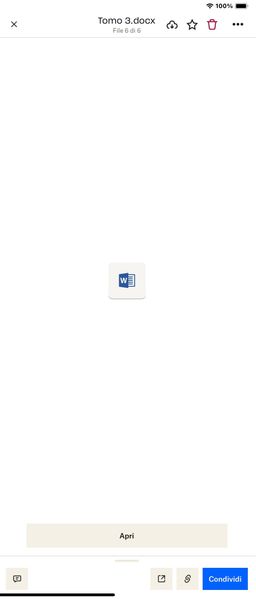
My .docx can't be previewed when using my iPad or iPhone.Is it too long, and why is this happening?
Hi everyone, sorry for the outburst, but it's absurd that an application like Dropbox has such a significant limit for those who work with word files of over 1000 pages. In my case, I have a file of ...

Nancy Dropbox Community Moderator
1 year agoDropbox Community ModeratorHi Noleafcloverx, and welcome to our forum!
Is there any chance the document is 190MB and not 1.9MB? If yes, then the size of the file would be the issue (the current limit is 160MB).
If not, can you test this via a different browser/incognito mode and let me know if the same error appears?
Finally, even if you can’t preview the file on Dropbox, there may still be an option to open and edit it. Can you check if you can do this? You can also send me a screenshot, if you prefer.
Keep me posted.

Noleafcloverx
1 year agoExplorer | Level 3
Here is a screenshot:
I've tried it on 2 different computers and also in incognito/private mode and this is the result each time:
 BenDBX1 year ago
Community Manager
Hi Everybody,
Thanks for reporting this. I've brought this to the attention of our engineering team who is currently investigating. We will post here when we have an update.
Regards,
Ben
 Richardo1 year agoExplorer | Level 4
It is important that you do not forget to provide an answer, for me it is really essential to work with a word file rather than a PDF, which would cause me enormous inconvenience
- Richardo1 year agoExplorer | Level 4
Hello, I note with great sadness that you frequently release updates, but without ever solving the problems reported to you, as has also happened in the past. It's a real shame because not solving the problems that are reported means that you don't care if people use a certain application and this does nothing but damage your reputation. Large companies are able to grow because they listen to people's feedback, accept advice and try to solve problems when they arise. Just to give you an example that you don't listen to us users of the application, because if we propose to add a 50 GB or 100 GB plan like all clouds we are never listened to? In the past I had given the idea of giving the possibility, within the application itself, of highlighting words from the test, as usual you replied that you had forwarded the feedback and today, years later, none of this exists, yet this function is there in some cloud. In any case, I am very disappointed and I think I will delete the application. Thank you and good day
- BenDBX1 year ago
Hi Everybody,
Our engineering team has implemented a fix. Can you try opening your Word files again and let us know if you're still receiving an error message? Thanks so much!
Regards,
Ben
- Richardo1 year agoExplorer | Level 4I updated the application and tried to open the files, unfortunately the problem persists. I also tried deleting the file from Dropbox and putting it back on Dropbox, it still DOESN'T open. Please report the problem to the engineers, it is important to solve it!
 AngeloMangione1 year agoHelpful | Level 5
Hi, I still have the same problem with the file. Still won't open, same problem. But are they sure they've solved it? Let the engineers know that the problem persists
 Riccardo31 year agoExplorer | Level 3
Hi, but is there any news on the problem of viewing files with many pages/words?
About View, Download, and Export

Get support with viewing, downloading, and exporting files and folders from your Dropbox account.
The Dropbox Community team is active from Monday to Friday. We try to respond to you as soon as we can, usually within 2 hours.
If you need more help you can view your support options (expected response time for an email or ticket is 24 hours), or contact us on X, Facebook or Instagram.
For more info on available support options for your Dropbox plan, see this article.
If you found the answer to your question in this Community thread, please 'like' the post to say thanks and to let us know it was useful!


