Your workflow is unique 👨💻 - tell us how you use Dropbox here.
Forum Discussion

andreascarlsson
6 months agoNew member | Level 2
My Dropbox folder is empty on the Mac, but I can see my files online.
macOS Tahoe (beta 9)
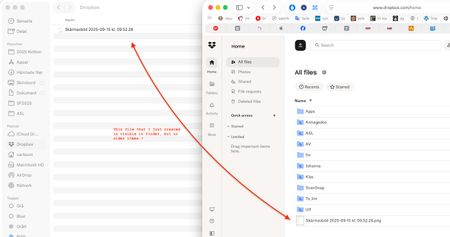
I just noticed that my Dropbox folder on my Mac is empty! When I log in to Dropbox online, all my files are still there though.
I tried moving a file into the Dropbox folder...
 6 months ago
None of the folders are selected, something have deselected them.
But it says "Only the selected folders will take up space on this device’s hard drive", which makes me worried that my drive will be filled up. However, there is also another sync setting that says "Only online". If those two statements contradict each other I suggest another wording in the selective sync dialogue.
I have checked some of the folders now, and they show up in Finder as they should, and it seems that they don't take any space.
That means problem solved and thanks for the help! Please change the wording on Selective sync though (I don't know how it's phrased in English, maybe that is correct). 🤗

Megan Dropbox Community Moderator
6 months agoDropbox Community ModeratorHi there, andreascarlsson let's jump right into this!
I'd like for us to check two things.
The first one is the app's current syncing status in order to make sure it's up-to-date. Can you check by hovering your mouse over the little Dropbox icon in your menu bar, next to your WiFi?
The second thing that came to mind is to check your selective sync settings. Is it possible that you temporarily unsynced some of your local folders?
Let me know what you find, and we'll take it from there.
andreascarlsson
6 months agoNew member | Level 2
Thanks for your input.
Sync is in order.
I realized that I used Dropbox 18 days ago, and IIRC I used Finder for that.
I haven't changed any settings that I'm aware of. Last time I did that was a couple of years ago when you introduced the "Store only Online" function (Same as Selective sync?) which I have for all my Dropbox files.
– And that may be what's wrong here; When I go into preferences the wording (I have the Swedish version so it may alter somewhat) is: "Choose which folders you see on this device Only the selected folders will take up space on this device’s hard drive. You can still access unselected folders anytime at dropbox.com."
However, I want to see the files in Finder, even though they are stored online. That has worked perfectly until now. As I remember it, there used to be three checkboxes: "Store on both Dropbox and computer," "Store only on Dropbox but still visible in Finder," and "Store only on Dropbox, not visible in Finder." (Though I wouldn't swear to that memory.)
- Megan6 months ago
Hey andreascarlsson, thanks for your speedy reply!
Have you made sure that your folders are selected when visiting your selective sync preferences?
Based on what you described it sounds like you're referring to a different feature -similar to selective sync- that helps you save hard drive space. If you need to see how to make your files online-only you can read more about this here.
About View, Download, and Export

Get support with viewing, downloading, and exporting files and folders from your Dropbox account.
The Dropbox Community team is active from Monday to Friday. We try to respond to you as soon as we can, usually within 2 hours.
If you need more help you can view your support options (expected response time for an email or ticket is 24 hours), or contact us on X, Facebook or Instagram.
For more info on available support options for your Dropbox plan, see this article.
If you found the answer to your question in this Community thread, please 'like' the post to say thanks and to let us know it was useful!


