Your workflow is unique 👨💻 - tell us how you use Dropbox here.
Forum Discussion

andreascarlsson
6 months agoNew member | Level 2
My Dropbox folder is empty on the Mac, but I can see my files online.
macOS Tahoe (beta 9)
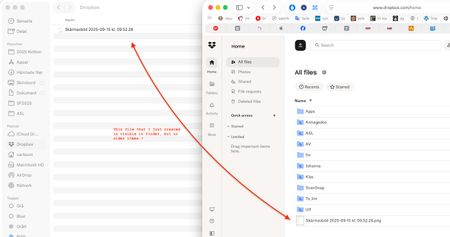
I just noticed that my Dropbox folder on my Mac is empty! When I log in to Dropbox online, all my files are still there though.
I tried moving a file into the Dropbox folder...
 6 months ago
None of the folders are selected, something have deselected them.
But it says "Only the selected folders will take up space on this device’s hard drive", which makes me worried that my drive will be filled up. However, there is also another sync setting that says "Only online". If those two statements contradict each other I suggest another wording in the selective sync dialogue.
I have checked some of the folders now, and they show up in Finder as they should, and it seems that they don't take any space.
That means problem solved and thanks for the help! Please change the wording on Selective sync though (I don't know how it's phrased in English, maybe that is correct). 🤗

Lalia
5 months agoNew member | Level 2
Sounds like it could be tied to the new Tahoe beta changes — maybe the files are still online-only and just not showing up locally the way they used to.
About View, Download, and Export

Get support with viewing, downloading, and exporting files and folders from your Dropbox account.
The Dropbox Community team is active from Monday to Friday. We try to respond to you as soon as we can, usually within 2 hours.
If you need more help you can view your support options (expected response time for an email or ticket is 24 hours), or contact us on X, Facebook or Instagram.
For more info on available support options for your Dropbox plan, see this article.
If you found the answer to your question in this Community thread, please 'like' the post to say thanks and to let us know it was useful!


