Your workflow is unique 👨💻 - tell us how you use Dropbox here.
Forum Discussion

eliv
2 years agoExplorer | Level 3
Smaller Header of Dropbox on the Website
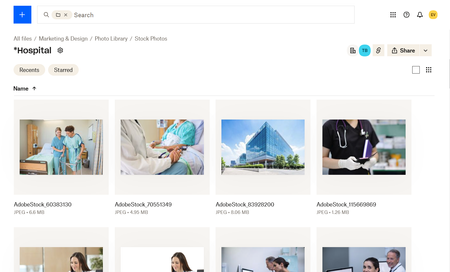
Hi, I work with a lot of videos and photos. It is beneficial to be able to see the thumbnails when I am searching for the right file. However, the Dropbox header takes up the top third of the screen....

Walter Dropbox Community Moderator
2 years agoDropbox Community ModeratorHi there eliv - thanks for the feedback!
It's been logged in our system - please let us know if you have anything else to add.
Thanks!

StapledonArts
1 year agoNew member | Level 2
I will note that this is a desktop specific issue. On the mobile app the header scrolls away and hides as I scroll through the folder.
For the website on desktop, is there a solution or setting that can be changed to hide the header containing the folder name, path, tags, users with access while I am scrolling the the folder? The header is static/frozen and occupies too much screen real estate which is interfering with my navigation of the folder.
- Hannah1 year ago
Hey StapledonArts, thanks for your reply here.
At the moment, there's no way to hide or disable this header.
I will make sure, however, that your comments are passed along to our team.
We appreciate your feedback and if you have any other questions let us know!
 mrtaxes1 year agoNew member | Level 2
Could you (DropBox) please allow the header information to be minimized when on desktop.

About View, Download, and Export

Get support with viewing, downloading, and exporting files and folders from your Dropbox account.
The Dropbox Community team is active from Monday to Friday. We try to respond to you as soon as we can, usually within 2 hours.
If you need more help you can view your support options (expected response time for an email or ticket is 24 hours), or contact us on X, Facebook or Instagram.
For more info on available support options for your Dropbox plan, see this article.
If you found the answer to your question in this Community thread, please 'like' the post to say thanks and to let us know it was useful!


