Our Community is in read-only mode until April 8th, learn more here. You can still search existing threads or get help via Dropbox Support, the Dropbox Help Center, or Learn.
Forum Discussion

Elsap
5 years agoExplorer | Level 3
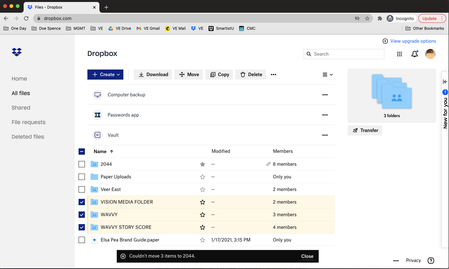
"Couldn't Move 1 Item"
Hello,
I have recently upgraded my Dropbox in an attempt to keep my folders organised.
I am trying to move "Wavvy", "Vision Media Folder" and "Wavvy Story Score" into the folder "2044", ...


Lynn McNamara
2 years agoExplorer | Level 4
Agreed, but like most software, those explanations are always buried deep within Guides, etc. I recently installed Dropsync on my Chromebook to help me download items to Dropbox. Turns out the file extension isn't supported by Dropbox. So I tried deleting, moving, dropping and dragging ... all the usual solutions to get the file to disappear. No luck. It's now frozen in Dropbox. I determined I couldn't delete it because it's a shared file (owned by another person), and that's part of the issue. Lesson learned. At least I didn't try to sync the other 50 files in the same format that were available!

TERRACE_87
2 years agoCollaborator | Level 10
Today I learned that if you are trying to move files/folders from one location locally available on your computer (via selective sync) to another location not locally available, you will get that error message.
About Delete, Edit, and Organize
Solve issues with deleting, editing, and organizing files and folders in your Dropbox account.
The Dropbox Community team is active from Monday to Friday. We try to respond to you as soon as we can, usually within 2 hours.
If you need more help you can view your support options (expected response time for an email or ticket is 24 hours), or contact us on X, Facebook or Instagram.
For more info on available support options for your Dropbox plan, see this article.
If you found the answer to your question in this Community thread, please 'like' the post to say thanks and to let us know it was useful!


