We’re Still Here to Help (Even Over the Holidays!) - find out more here.
Forum Discussion

jb43
3 years agoHelpful | Level 6
Edit a text (*.txt) file in Chrome browser
Hi there, I'm struggling to edit a TXT file in Chrome browser on Dropbox. I'm sure I've done it with a .docx file before. When I search for this feature, Google returns results asking for it ba...

jb43
3 years agoHelpful | Level 6
Thanks for the reply Nancy .
> As mentioned above, there isn’t currently a built-in function to edit .txt files via your web browser. We’ve passed your feedback along to our team, but we can’t share something more for the time being.
After some research, I found an app, StackEdit.io, a markdown editor, allowing me to edit Text Files in my Dropbox: https://stackedit.io/app
It's not part of the Dropbox App center (https://www.dropbox.com/apps). Since I connected with it, it appears in my connected apps at https://www.dropbox.com/account/connected_apps, but is it possible to get it to appear in the "Open With" menu when viewing a text file on Dropbox web?
Incidentally, looking for web-based markdown editors syncing with Dropbox, I also learnt that Dropbox Paper is one of them! Likely built over Hackpad. However today, Dropbox Paper cannot open and edit text files already in my Dropbox. In my opinion it's a bit of a shame: Dropbox Paper is overlapping with Google Docs, with no "killer feature". It has actually dropped its differentiating feature, which is seemingly missing from the Dropbox App center: the ability to edit text files already in Dropbox.
> As per the “Open in” menu, can you please try to clear your browser’s cache, check if there are any pending updates on your browser and also, open an incognito window and let me know if you see any difference there?
Sure. I logged in in an incognito window (latest Chrome version on MacOS) and observed the same behavior happens (menu opens but is empty and shows a narrow line).

Jay Dropbox Community Moderator
3 years agoDropbox Community ModeratorHi jb43, we appreciate the feedback about how to improve the service.
Regarding the 'Open with' menu, it only applies to a few authorized apps, and it wouldn't be possible to manually add another app to that list.
- jb433 years agoHelpful | Level 6
Hi all,
Are you aware of any changes on this front?
I have noticed that, for .txt files in my Dropbox, using the latest Chrome browser versions:
- on iOS, the button "Open In" shows "Connect Apps" button, instead of nothing
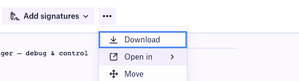
- on Windows, the same button also shows "Connect Apps", and it now shows "Notepad" and "File Explorer". See screenshot.
Update: When changing my default application for TXT from Notepad to Notepad++, it also updates that menu on Dropbox website.
That's very good news!
- Nancy3 years ago
At the moment, I’m afraid we don’t have any further updates on this.
I’d glad to hear though you’re seeing the correct app after updating it on your device!
 L03 years agoExplorer | Level 4
> Update: When changing my default application for TXT from Notepad to Notepad++, it also updates that menu on the Dropbox website.
That's very good news (FROM: jb43 DATED: February on this post)
Hi all, there is some way to let work the WORKAROUND with notapad++?
Installed Chrome, installed Notepad++, set Notepad++ as the default .txt editor, open Dropbox in Chrome, doesn't appear that menu on the Dropbox website.
# INFO
OS used: Windows 10 Pro(x64) - 22H2
Chrome: 112.0.5615.50 (64-bit)
Notepad++: v8.5

About Delete, edit, and organize
Solve issues with deleting, editing, and organizing files and folders in your Dropbox account with support from the Dropbox Community.
The Dropbox Community team is active from Monday to Friday. We try to respond to you as soon as we can, usually within 2 hours.
If you need more help you can view your support options (expected response time for an email or ticket is 24 hours), or contact us on X, Facebook or Instagram.
For more info on available support options for your Dropbox plan, see this article.
If you found the answer to your question in this Community thread, please 'like' the post to say thanks and to let us know it was useful!


