We’re Still Here to Help (Even Over the Holidays!) - find out more here.
Forum Discussion

Terry P.
2 years agoCollaborator | Level 10
Text Editor no longer usable free in Files App
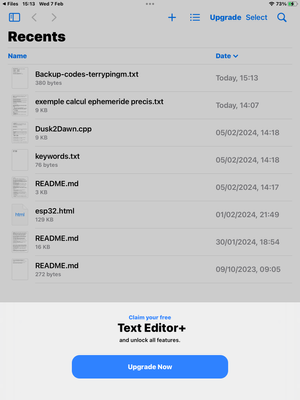
Suddenly have this major problem: I cannot work on text files in my iPad FILES app. Can't open, move, copy, whatever. I get the messages shown in the attached screenshots. I sure don't want to pay £5...
 2 years ago
Thanks Hannah, I think you're right. I get the same behaviour in all the FILES app locations. I also posted identical request in the Apple iPad forum:
https://discussions.apple.com/thread/255463882?sortBy=best
But posted here partly because I wasn't 100% sure I could rule out Dropbox but also hoping other Dropbox users who also have iPads could advise if they had same issue.
Terry, UK

Hannah Dropbox Community Moderator
2 years agoDropbox Community ModeratorHey Terry P., thanks for reaching out to the Dropbox Community.
This looks like it's coming from your OS and not Dropbox.
Do you only see these pop-ups when trying to edit .txt files in Dropbox? How about other locations in the files app?
Keep me posted.
- Terry P.2 years agoCollaborator | Level 10
Thanks Hannah, I think you're right. I get the same behaviour in all the FILES app locations. I also posted identical request in the Apple iPad forum:
https://discussions.apple.com/thread/255463882?sortBy=best
But posted here partly because I wasn't 100% sure I could rule out Dropbox but also hoping other Dropbox users who also have iPads could advise if they had same issue.
Terry, UK
- Hannah2 years ago
Thanks for the update, Terry!
Hopefully, this will get resolved for you the soonest possible.
If you need anything else, please let us know!
About Delete, edit, and organize
Solve issues with deleting, editing, and organizing files and folders in your Dropbox account with support from the Dropbox Community.
The Dropbox Community team is active from Monday to Friday. We try to respond to you as soon as we can, usually within 2 hours.
If you need more help you can view your support options (expected response time for an email or ticket is 24 hours), or contact us on X, Facebook or Instagram.
For more info on available support options for your Dropbox plan, see this article.
If you found the answer to your question in this Community thread, please 'like' the post to say thanks and to let us know it was useful!


