Your workflow is unique 👨💻 - tell us how you use Dropbox here.
Forum Discussion

Catalina1
1 year agoHelpful | Level 5
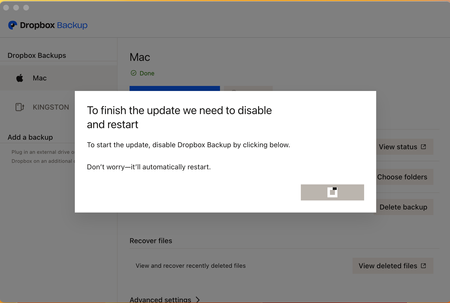
Dropbox Backup stuck updating to new version - can't dismiss the update window on macOS
Hello,
I store all of my files in Dropbox, including those on my desktop and downloads. Two days ago, I was prompted with a window from Dropbox, asking me to accept the new Dropbox Backup feature. ...

Catalina1
1 year agoHelpful | Level 5
Hi Megan. No, I can’t. I can only see the files inside the Dropbox folder. Since the update, I’m no longer able to view my synced files from other devices (The Documents, Desktop and Download Folders). This new version has essentially ruined the functionality that made Dropbox so useful for me. I now have to log onto the Dropbox website to access my backups, which is really inconvenient and doesn’t make sense.

Jay Dropbox Community Moderator
1 year agoDropbox Community ModeratorHi Catalina1, I'd recommend contacting the support team directly for them to investigate this matter in more detail on their end.
About Create, Upload, and Share
Find help to solve issues with creating, uploading, and sharing files and folders with Dropbox.
The Dropbox Community team is active from Monday to Friday. We try to respond to you as soon as we can, usually within 2 hours.
If you need more help you can view your support options (expected response time for an email or ticket is 24 hours), or contact us on X, Facebook or Instagram.
For more info on available support options for your Dropbox plan, see this article.
If you found the answer to your question in this Community thread, please 'like' the post to say thanks and to let us know it was useful!


