Your workflow is unique 👨💻 - tell us how you use Dropbox here.
Forum Discussion

Andika Scofield
2 years agoExplorer | Level 4
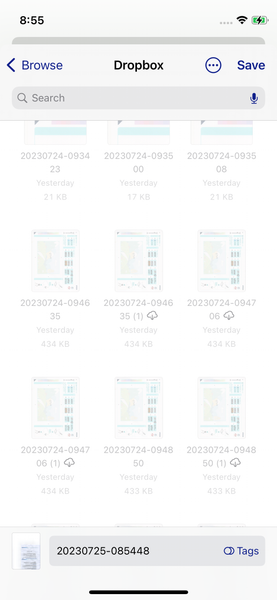
Dropbox duplicates a file when copy from iPhone Files app to Dropbox. Why?
Halo,
I'm Andi, iOS dev.
I found an issue when creating files to Dropbox, through "Files" in iPhone.
When I save my file to Dropbox from my app, sometimes that file will be duplicated.
...

Andika Scofield
2 years agoExplorer | Level 4
Megan thank you for your advice, this issue no longer occur.
Andika Scofield
2 years agoExplorer | Level 4
hallo Megan
Yesterday I found again this issue, even when I re-enable and restart my device. What should I do?
I have a related question about Dropbox showing up in the Files app, since when did Dropbox support the Files app on the iPhone?
- Jay2 years ago
Dropbox Community Moderator
Hi Andika Scofield, Dropbox has supported the Files app since it was introduced. The behavior you're experiencing seems to be a device or app-related matter, since no other users are reporting this.
As you're creating an app, are you linking to the Dropbox API? Should I move this post to the API forum for the team there to assist?
 FlyingDutch72 years agoExplorer | Level 3For sure there are more Dropbox users with excactly the same issue, found this issue too last week and it is frustrating because of the bigger harddisk storage i need.
- Hannah2 years ago
Hey FlyingDutch7, can you confirm if you see the same issue, when manually uploading the file to the Dropbox app, using the + button?
- FlyingDutch72 years agoExplorer | Level 3Hello Hannah, than the file is uploaded as 4MB .JPG iso the duplicated 8MB. Why is That? What is happening
- Hannah2 years ago
Is that after copying from Files or after a manual upload?
- FlyingDutch72 years agoExplorer | Level 3Manual upload
- Megan2 years ago
Hi FlyingDutch7, sorry to jump in here!
Can you also clarify your OS the the Dropbox version you're using, please?
- FlyingDutch72 years agoExplorer | Level 3344.2.4
IOS 16.6 - FlyingDutch72 years agoExplorer | Level 3Good morning drobox staff, i have to apologize that i put my issue in the wrong discussion of this community forum. My reply in this discussion belongs to “Picture Uploads from iPhone to Dropbox (file size varies). Is it possible to continue this in that discussion?
- Hannah2 years ago
Hey FlyingDutch7, unfortunately, the thread you're referring to is closed to new replies, so it cannot be replied to.
Can you give us more info about your issue here?
- FlyingDutch72 years agoExplorer | Level 3The photo uploaded to Dropbox from IPhone is 2 x the size bigger as the original but in the meantime i suppose to know whats going on. It has something to do with Live Photos which are not saved as Live Photo but only 1 image. I’m almost sure that is the issue. So the next question is, what can i do to save it as a Live Photo?
- Jay2 years ago
Hi FlyingDutch7, you can upload Live Photos by going into the Dropbox mobile app settings > Camera Uploads > Videos, and enable the 2 second video option.
- FlyingDutch72 years agoExplorer | Level 3Can’t find this option, can you check this statement for me please? “Dropbox mobile app settings > Camera Uploads > Videos, and enable the 2 second video option.”
App version is 344.2.4 - Megan2 years ago
Hi FlyingDutch7, if you go to the camera uploads settings and tap on 'upload from', do you not see 'live photos' as an option?
Can you also attach a screenshot of what you're seeing on the camera uploads > videos option?
- FlyingDutch72 years agoExplorer | Level 3I have now Selected the Live Photos in iso camerarol but no 2 second video option Jay said. And how can i upload the screenshot in this forum? This is what i did before but the live photo then becomes a standard .jpg photo
- Megan2 years ago
If you could simply upload some .jpg here, that'd be amazing FlyingDutch7.
Did the files upload after selecting the Live Photos?
- FlyingDutch72 years agoExplorer | Level 3Live Photos are uploaded but result is a static .jpg image and not a 2 second live photo (video). How can i upload a .jpg in this forum?
- Walter2 years ago
Hey FlyingDutch7, sorry to jump in here, but I just wanted to mention that you can upload a screenshot via the camera icon (insert photos) option within your reply's box.
- FlyingDutch72 years agoExplorer | Level 3There is NO camera icon (insert photos) option within the reply's box. Tap my finger on the screen also nothing
- Walter2 years ago
If you're on a mobile device, you can try requesting the desktop version of the site to see the button FlyingDutch7
- FlyingDutch72 years agoExplorer | Level 3
This is a Live Photo uploaded to dropbox as static .jpg image iso 2 second movement as a video should look like.
- Megan2 years ago
Hi FlyingDutch7, I hope you're doing well!
Apologies here, we just double checked with our Team, and the upload of live photos is not an option at this time. We'll share updates on this when available.
Thank you!
 abrech-mt1 year agoNew member | Level 1
It's 2024 - and we are having this issue as well.


About Create, Upload, and Share
Find help to solve issues with creating, uploading, and sharing files and folders with Dropbox.
The Dropbox Community team is active from Monday to Friday. We try to respond to you as soon as we can, usually within 2 hours.
If you need more help you can view your support options (expected response time for an email or ticket is 24 hours), or contact us on X, Facebook or Instagram.
For more info on available support options for your Dropbox plan, see this article.
If you found the answer to your question in this Community thread, please 'like' the post to say thanks and to let us know it was useful!


