Your workflow is unique 👨💻 - tell us how you use Dropbox here.
Forum Discussion

keturner12
2 years agoExplorer | Level 4
Error: "This link isn't quite right. Usually this happens when the link wasn't copied exact right"
I have been trying to share a FOLDER (not a link) with several of our music club members. About 1-2 weeks ago, members told me they could not access the folder because of the following error message...
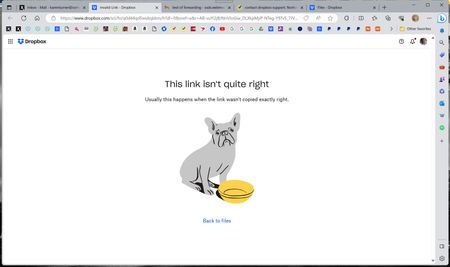

keturner12
2 years agoExplorer | Level 4
Hi again,
Just heard back from another customer who said when he clicks on the folder it says, "can't display the link."
KT

Hannah Dropbox Community Moderator
2 years agoDropbox Community ModeratorNo worries, Karen! Let us know, when you can. 🙂
 keturner122 years agoExplorer | Level 3Hi Hanah and Jay. I decided to think of an alternate solution as my members need these files. This problem has existed for over a week. Though I appreciate your assistance, I am no closer to resolving this. I created an another folder and copied the original folder files to it. My new members who can’t get into the original folder will now be invited to this second duplicate folder. Over 100 members will still get updates in the original folder. It will be just a little more work for me to maintain 2 identical content folders, but at least it will work. Thank you for your assistance. Karen
 Jodlee2 years agoNew member | Level 2
I am experiencing exactly the same problem described above - is there any solution?
- Hannah2 years ago
Hey Jodlee, sorry to see you're having this issue.
When the member you've invited to the folder, go to their "Shared" tab, are they able to access and add the folder to their Dropbox from there?
- keturner122 years agoExplorer | Level 3Hi. This issue was NEVER resolved. I ended up creating a duplicate folder folder and invite our new members to that new folder. The original problem folder works just fine as long as I don’t invite new people to share it. Go figure.
Karen
Silver Strings Webmaster
About Create, Upload, and Share
Find help to solve issues with creating, uploading, and sharing files and folders with Dropbox.
The Dropbox Community team is active from Monday to Friday. We try to respond to you as soon as we can, usually within 2 hours.
If you need more help you can view your support options (expected response time for an email or ticket is 24 hours), or contact us on X, Facebook or Instagram.
For more info on available support options for your Dropbox plan, see this article.
If you found the answer to your question in this Community thread, please 'like' the post to say thanks and to let us know it was useful!


