We’re Still Here to Help (Even Over the Holidays!) - find out more here.
Forum Discussion

james barnard
9 months agoExplorer | Level 3
Files that I update on my Mac don't sync online.
In the last couple of weeks, local files that I work on are not syncing online. If they do, it is extremely slow. My internet is fine. I am on a Mac as well. I work synchronously with others on these...

james barnard
9 months agoExplorer | Level 3
Hi Megan, it is 220.4.4126. I quit the app and started it again. It says it is indexing 76 files. This has been going on for about a month.
- Megan9 months ago
Dropbox Community Moderator
Thank you, James!
Let's see what we can do to fix this. Could you tell me if your Dropbox folder is located in ~/Library/CloudStorage?
Have you tried uninstalling the app, and then reinstalling again?
- james barnard9 months agoExplorer | Level 3
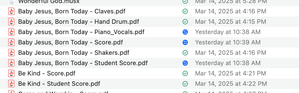
Hi Megan, I don't believe it is located there: Here is a screenshot
- Megan9 months ago
Hey james barnard!
Is the app still stuck syncing the same number of files as before?
Did you try the uninstall steps I provided in my previous reply?

About Create, upload, and share
Find help to solve issues with creating, uploading, and sharing files and folders in Dropbox. Get support and advice from the Dropbox Community.
The Dropbox Community team is active from Monday to Friday. We try to respond to you as soon as we can, usually within 2 hours.
If you need more help you can view your support options (expected response time for an email or ticket is 24 hours), or contact us on X, Facebook or Instagram.
For more info on available support options for your Dropbox plan, see this article.
If you found the answer to your question in this Community thread, please 'like' the post to say thanks and to let us know it was useful!


