We’re Still Here to Help (Even Over the Holidays!) - find out more here.
Forum Discussion

BobF1
4 years agoHelpful | Level 6
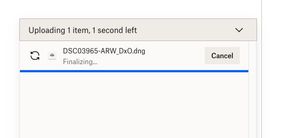
I'm trying to upload a small file, but finalizing is taking forever when using the desktop app.
Trying to upload a dng file that is about 90MB in size to my gallery - fter taking the 3 minutes indicated it has been 15 minutes with the screen saying 1 second left and "finalizing"...what is going...
 4 years ago
Thank you, actually, I did switch from Firefox to Safari and that worked...

Megan Dropbox Community Moderator
3 years agoDropbox Community ModeratorHi anajand, sorry to hear you're having trouble with this!
In order for us to be able to identify if this is a browser specific issue, we would need to check if the same behavior is present on another browser. If you could give it a go, just to exclude that as a possibility, that'd be great.
You can also try to upload the file using an incognito tab on Chrome, and clearing your browser's cache would also help. Does that happen with this specific file only?
Keep me posted!

Jendawick
3 years agoNew member | Level 2
I am also having this problem—on all browsers. And I just paid for another year of pro at $199 a year. Oof.
- Megan3 years ago
Hi Jendawick, sorry to hear about that!
You mentioned this happens on all of your browsers. Does this happen with certain files/folders or some of them?
Can you clarify the size and file type of content you're uploading?
Keep me posted!
 NotHappy3 years agoExplorer | Level 3Hey Dropbox
**bleep** this. 2GB file not finalising. My client is waiting for it. Now I have to re-upload the entire thing. Fix this **bleep**.- Megan3 years ago
Hi NotHappy, I'd love to get to the bottom of this with you.
I understand that this isn't ideal, but I'd really like to see what might be causing this.
Were you uploading your file directly to your account, or using a File transfer possibly?
Also, did you notice this behavior on one specific browser, or did you try more?
Let me know, and we'll take it from there!
About Create, upload, and share
Find help to solve issues with creating, uploading, and sharing files and folders in Dropbox. Get support and advice from the Dropbox Community.
The Dropbox Community team is active from Monday to Friday. We try to respond to you as soon as we can, usually within 2 hours.
If you need more help you can view your support options (expected response time for an email or ticket is 24 hours), or contact us on X, Facebook or Instagram.
For more info on available support options for your Dropbox plan, see this article.
If you found the answer to your question in this Community thread, please 'like' the post to say thanks and to let us know it was useful!


