Your workflow is unique 👨💻 - tell us how you use Dropbox here.
Forum Discussion

LisanderI
2 years agoExplorer | Level 3
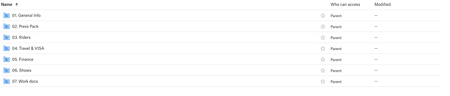
I need some Team folders to be accessible through a shared link, but shows as "parent".
I work for an agency and we need to share specific folders within an artist folder, and those folders need to be accesible by link and view only for external accounts. We have tried to change all...

LisanderI
2 years agoExplorer | Level 3
Correct, external access to specifically 2 subfolders need to be given to anyone with the link but should not be able to edit the documents or folders.
- I have taken these steps to obtain a view only link, however 'anyone with the link can edit' also exists
- It should be that team members should be able to access all folders (including subfolders) and edit these.
I understand that 'parent' means that everyone that is 'parent' has access to all folders, inlcluding subfolders but when I share a specific subfolder and that subfolder should be accessible to anyone with the link, should it not be: parent + other? When I edit the permissions, it show parent+ other first but after refreshing it goes back to just 'parent'.

Hannah Dropbox Community Moderator
2 years agoDropbox Community ModeratorThanks for the screenshot, LisanderI.
Your external sharing settings appear to be correct.
Since when you're creating the link, it appears to be correct as well, have you tried testing how it looks for your recipients, by opening the link through a private browsing/incognito window?
How does it look? Is it giving access to the correct folders?
About Create, Upload, and Share
Find help to solve issues with creating, uploading, and sharing files and folders with Dropbox.
The Dropbox Community team is active from Monday to Friday. We try to respond to you as soon as we can, usually within 2 hours.
If you need more help you can view your support options (expected response time for an email or ticket is 24 hours), or contact us on X, Facebook or Instagram.
For more info on available support options for your Dropbox plan, see this article.
If you found the answer to your question in this Community thread, please 'like' the post to say thanks and to let us know it was useful!


