Your workflow is unique 👨💻 - tell us how you use Dropbox here.
Forum Discussion

anonymous
2 years agoiPhone Photos Syncing/Refresh issues since new version 346.4 install
Hi .... Since Dropbox has updated itself to version 346.4 the Photos page (pic shown below)isn't updating when new photos are taken. The new photos sync/backup correctly with Dropbox and appear in th...
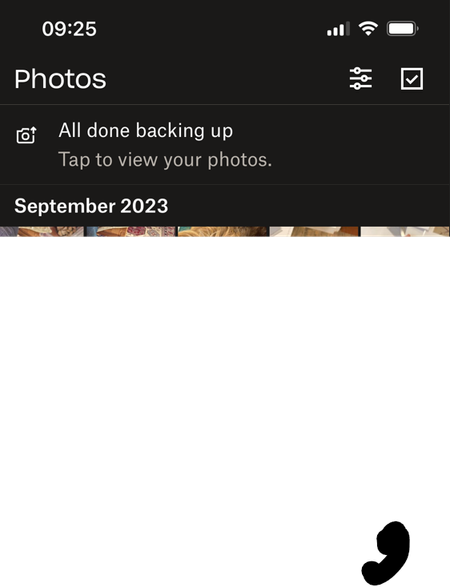
anonymous
2 years agoWalter Any thoughts?
Not sure if its related but I can't now see my photo's online - I'm just getting a "Almost There" message see pic below....
As a test I've also removed every photo that I have on Dropbox but I'm still getting the same error with both the iPhone and the DB website, plus the iPhone is doing the same thing as the DB website continuously looking for non existent photos - see pic below ... ? Frustrated!
Pictures are syncing to the Camera Uploads Folder without a problem ...
Edited to say my iPad is still showing the photo's via the DB app which have been removed from DB website .... Guessing here, it would seem my DB account has frozen with regards to updating photos perhaps.
anonymous
2 years agoNo replies but I've managed to fix it..... the below may help someone.
I had to remove all my photos from Dropbox which still left thousands of picture files from my backups which were moved to the Vault to stop them being indexed.
I then deleted the Drobox app from my iPhone.
I logged into Dropbox.com and waited for nearly 8 hrs for the Photos page to reset and appear empty with no warning messages.
Started to reload my photos via the Dropbox Windows 11 app back up to Dropbox
I let them sync
Reinstalled the latest Dropbox app on my iPhone and let that fully sync my photos which is now picking up any new photos taken.
Kept the numerous random picture files located in my backups folders stored in the Vault.
No idea why both the website and the iPhone Dropbox app locked up with my photos - maybe it has something to do with trying to sync numerous random picture files from all over my Dropbox account.... shame we can't be more selective with what Pictures/photos we sync.
About Create, Upload, and Share
Find help to solve issues with creating, uploading, and sharing files and folders with Dropbox.
The Dropbox Community team is active from Monday to Friday. We try to respond to you as soon as we can, usually within 2 hours.
If you need more help you can view your support options (expected response time for an email or ticket is 24 hours), or contact us on X, Facebook or Instagram.
For more info on available support options for your Dropbox plan, see this article.
If you found the answer to your question in this Community thread, please 'like' the post to say thanks and to let us know it was useful!


