Your workflow is unique 👨💻 - tell us how you use Dropbox here.
Forum Discussion

anonymous
2 years agoiPhone Photos Syncing/Refresh issues since new version 346.4 install
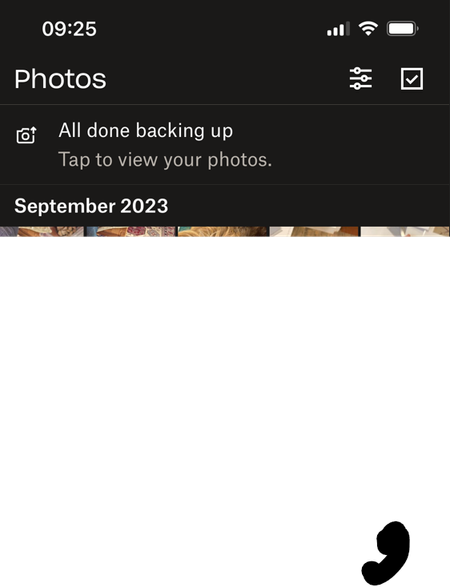
Hi .... Since Dropbox has updated itself to version 346.4 the Photos page (pic shown below)isn't updating when new photos are taken. The new photos sync/backup correctly with Dropbox and appear in th...
anonymous
2 years agoThanks for the reply ....
Could you clear the app's cache and log out and back in again after rebooting your iPhone?
All done but it hasn't fixed the problem. On first start up after re-entering my details the DB Photo page updates with all the latest photos. I then take some new photos which all appear in the DB Camera Uploads folder & Online, but the iPhone DB app Photo page didn't update to show the new pictures.
If that won't work, you can also try turning the camera uploads feature off and then back on in the app's settings.
Made no difference.

MartinDevoto
1 year agoExplorer | Level 3
I am having the same exact issue, non responsive to the above measures, in my iPhone 13 Pro
- Hannah1 year ago
Dropbox Community Moderator
Hey MartinDevoto, thanks for the nudge here.
Which version of the Dropbox app are you using and which iOS version?
- MartinDevoto1 year agoExplorer | Level 3
App version 392.3.2
iOs 17.6.1
- Hannah1 year ago
Thanks for that, Martin.
Can you also confirm that you've cleared the app's cache and have uninstalled it, restarted the device and then reinstalled it?

About Create, Upload, and Share
Find help to solve issues with creating, uploading, and sharing files and folders with Dropbox.
The Dropbox Community team is active from Monday to Friday. We try to respond to you as soon as we can, usually within 2 hours.
If you need more help you can view your support options (expected response time for an email or ticket is 24 hours), or contact us on X, Facebook or Instagram.
For more info on available support options for your Dropbox plan, see this article.
If you found the answer to your question in this Community thread, please 'like' the post to say thanks and to let us know it was useful!


