Your workflow is unique 👨💻 - tell us how you use Dropbox here.
Forum Discussion

Stretch1
2 years agoExplorer | Level 3
Mac: Dropbox Backup - "Error - can't backup this device"
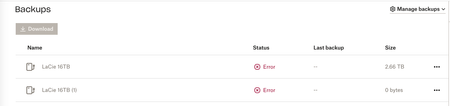
I have an external drive connected to my Mac (iMac 2020. Big Sur 11.7.9. Dropbox 183.4.7058). The drive shows up on the desktop and there're no issues with it. Approx 2 weeks ago it stopped syncing...

Walter Dropbox Community Moderator
2 years agoDropbox Community ModeratorHi Stretch1, sorry to hear you're having issues with this.
Could you try hovering your mouse over the error shown on your first screenshot? Does it give any additional information perhaps?
If you've already reached out to our support team about this, please let us know your ticket ID so that we can look it up as well.
Thanks!

Stretch1
2 years agoExplorer | Level 3
Hi when I hover over "error" the text says "can't backup device. Plug in device again to restart the backup process"
I have tried ejecting and remounting the ext. drive - it shows up on the desktop and functions ok but still shows Error in Backups
Have also tried physically unplugging it, disconnecting the power supply and then plugging it back in, also doesn't work
- Walter2 years ago
I'm assuming you've also rebooted your device Stretch1?
If you did and this persists, please let me know if it'd be OK if we reached out via email to have a further look internally.
- Stretch12 years agoExplorer | Level 3
Yes - have restarted device, reinstalled Dropbox, also reinstalled Mac OS recently but the problem persists.
Feel free to email
About Create, Upload, and Share
Find help to solve issues with creating, uploading, and sharing files and folders with Dropbox.
The Dropbox Community team is active from Monday to Friday. We try to respond to you as soon as we can, usually within 2 hours.
If you need more help you can view your support options (expected response time for an email or ticket is 24 hours), or contact us on X, Facebook or Instagram.
For more info on available support options for your Dropbox plan, see this article.
If you found the answer to your question in this Community thread, please 'like' the post to say thanks and to let us know it was useful!


