Your workflow is unique 👨💻 - tell us how you use Dropbox here.
Forum Discussion

Stretch1
2 years agoExplorer | Level 3
Mac: Dropbox Backup - "Error - can't backup this device"
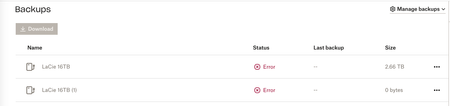
I have an external drive connected to my Mac (iMac 2020. Big Sur 11.7.9. Dropbox 183.4.7058). The drive shows up on the desktop and there're no issues with it. Approx 2 weeks ago it stopped syncing...

Walter Dropbox Community Moderator
2 years agoDropbox Community ModeratorThanks for the cooperation and happy Monday Stretch1
I've just followed up via email so please have a look at your inbox and we'll take it from there.

joacojaviel
1 year agoNew member | Level 1
hellooo i have the same problem!
- Megan1 year ago
Hey joacojaviel, let's jump right into this!
Can you let me know if you've tried any of the troubleshooting steps mentioned on our thread?
Also, how is your external drive formatted, and what is the OS you're using on your end?
Let me know more, and we'll take it from there!
- joacojaviel1 year agoNew member | Level 1
Hi! Yes, I tried all the steps. Strong wifi, proper firewall, good condition of the hard drive and cables.
I do the backup once a year. One year per folder. These days I couldn't upload the one from 2024. So I did it before. The one from 2024 is incomplete in Backups
I have macOS Sequoia 15.3, and I think the files are FAT32
- Megan1 year ago
Got it, thanks for the heads up joacojaviel!
Would you mind also confirming the version of the Dropbox app that you have installed on the device? You can find this by hovering your mouse over the little Dropbox icon on your menu bar, next to your WiFi.
Also, it might sound trivial but have you restarted your device at all? I'd also like for us to try one more thing, please.
Could you ensure you have write access to the drive? Make sure that the group 'everyone' has 'Read and Write' access to the external drive by following the steps here.

About Create, Upload, and Share
Find help to solve issues with creating, uploading, and sharing files and folders with Dropbox.
The Dropbox Community team is active from Monday to Friday. We try to respond to you as soon as we can, usually within 2 hours.
If you need more help you can view your support options (expected response time for an email or ticket is 24 hours), or contact us on X, Facebook or Instagram.
For more info on available support options for your Dropbox plan, see this article.
If you found the answer to your question in this Community thread, please 'like' the post to say thanks and to let us know it was useful!


