Your workflow is unique 👨💻 - tell us how you use Dropbox here.
Forum Discussion

emihar
1 day agoNew member | Level 2
My Backup online shows as 0 bytes. What is happening?
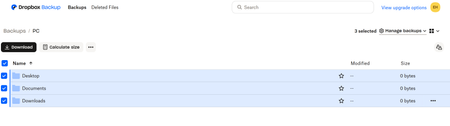
Hi I was able to download the Dropbox App for my surface pro and setup the backup. After successfully backing up, the dropbox online says my "Desktop" "Documents" & "Downloads" backed up but there ar...

emihar
3 hours agoNew member | Level 2
Hi Megan,
I downloaded the dropbox app to my computer on March 1st. I selected to backup just 3 folders Desktop, Documents, Downloads.
I remember there was an option to ignore folders but I decided it was easier just to select the folders I wanted to backup.
I clicked Backup and in the Dropbox app on my computer, it says a Backup was updated on 3/1/2026 at 11:36 AM. But, when I looked at Dropbox online, all of the folders were 0 bytes.
Now, I'm on my 3rd day of Updating the Backup. It seems to never end. (Sorry, it wouldn't all me to attach my screenshot. I got a warning message)
Did I do something wrong?
Thank you,
Emily
p.s. Nothing appears when I hover over the dropbox icon in my taskbar. ?
About Create, Upload, and Share
Find help to solve issues with creating, uploading, and sharing files and folders with Dropbox.
The Dropbox Community team is active from Monday to Friday. We try to respond to you as soon as we can, usually within 2 hours.
If you need more help you can view your support options (expected response time for an email or ticket is 24 hours), or contact us on X, Facebook or Instagram.
For more info on available support options for your Dropbox plan, see this article.
If you found the answer to your question in this Community thread, please 'like' the post to say thanks and to let us know it was useful!


