We’re Still Here to Help (Even Over the Holidays!) - find out more here.
Forum Discussion

Johnald8
2 years agoExplorer | Level 3
Network error when uploading files to mobile app on Android
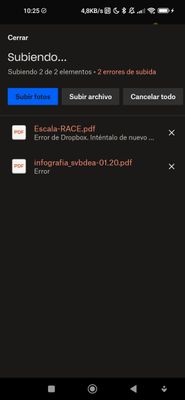
Since last week, file uploads from Android App do not work anymore.
I follow the usual procedure, selecting the files, "adding/sharing" them to dropbox. It starts to upload but gets stuck and fails...

Hannah Dropbox Community Moderator
2 years agoDropbox Community ModeratorThanks for bringing this to our attention, Johnald8.
Can you let us know which Android version and which Dropbox version you're using?
Also, where are you saving the file from? Another app or is it saved on your phone?
And can you confirm that you have at least 500mb of free space on the device itself? That's what's needed for the Dropbox app to work correctly.
Keep me posted.
 Johnald82 years agoExplorer | Level 3
Thank you for your support Hannah, here is the situation
Android version: MIUI 13.0.3.0 stable (Phone: Xiaomi Redmi 9 Note plus)
Dropbox version: 358.2.4 (current latest version)
The files are stored locally in the SD card and in the internal memory of the phone.
Used space: 13,31 GB out of 17,38 GB (more than free 500 MB)
About Create, upload, and share
Find help to solve issues with creating, uploading, and sharing files and folders in Dropbox. Get support and advice from the Dropbox Community.
The Dropbox Community team is active from Monday to Friday. We try to respond to you as soon as we can, usually within 2 hours.
If you need more help you can view your support options (expected response time for an email or ticket is 24 hours), or contact us on X, Facebook or Instagram.
For more info on available support options for your Dropbox plan, see this article.
If you found the answer to your question in this Community thread, please 'like' the post to say thanks and to let us know it was useful!


