Need to see if your shared folder is taking up space on your dropbox 👨💻? Find out how to check here.
Forum Discussion

batilly84
5 years agoExplorer | Level 4
Right click menu missing (Mac OS)
Hello,
Thought I would reach out to you directly with a problem that I don't see the specific solution to.
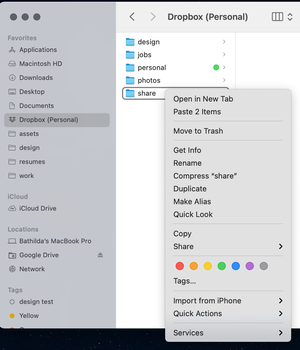
My right click menu suddenly disappeared today while working on files in a Drop...

asbrown72
4 years agoHelpful | Level 5
Actually, I've since discovered the problem. It's because Dropbox, in their wisdom, have removed the function to share anything that is backed up. Now, naturally, all the files I'm working on are on the desktop of my Mac, which had been backed up via Dropbox. That now means I can do only very limited things with every file on my desktop, and that does not include sharing via a Dropbox link. Why have they done this? In their words, to avoid our inadvertently sharing sensitive files! I mean, talk about treating your customers like children. How dare they decide what we can and we cannot share of our own files? I've found an inelegant workaround, but really Dropbox you need to reverse this and reinstate the function to share any backed-up file, folder or drive.

JeffSimpson911
4 years agoNew member | Level 2
totally agree. I used that quick share function multiple times a day, it was a time saver. If it is gone for good I think I'll just move everything over to google drive =(
 danbett4 years agoHelpful | Level 7
Hi Dropbox/Megan, would anyone care to reply to our concerns or is that too much to ask? Hope to hear from you soon
regards
Dan B
- Megan4 years ago
Dropbox Community Moderator
Hi all! I hope you're doing well!
It is indeed not possible to share files from the backup folder any more. That happened, in order to ensure the security of your files, as a lot of people have very personal files saved there.
I do understand your frustration and I will definitely pass your comments along to our team.
Now, if you experience this behavior with paths outside of the backup folder, can you try opening a ticket with our Support team, in order for them to have a closer look into this?
Provided you face trouble doing so, let me know and I'll jump in to help.
Thank you!
- danbett4 years agoHelpful | Level 7
So if I stop backing up my computer, can I save my whole desktop and documents on dropbox so I can get this back, also why does dropbox not give any advance warning of this and why can we not choose, I don't feel that you have answered any questions here at all or provided any help or work around. And no, we are not doing well I suspect, I think we are all a little bit angry...
I ask again, please will you give us some real help and not fob us off, if you don't want to help any more then please provide a clear escalation path to this problem to someone who can actually help.
regards
Dan B
P.s I am not venting and I really don't want to be writing these emails, I just want the service that I signed up for and pay for and for it not be to radically altered with no warning and no consent

About Create, upload, and share
Find help to solve issues with creating, uploading, and sharing files and folders in Dropbox. Get support and advice from the Dropbox Community.
The Dropbox Community team is active from Monday to Friday. We try to respond to you as soon as we can, usually within 2 hours.
If you need more help you can view your support options (expected response time for an email or ticket is 24 hours), or contact us on X, Facebook or Instagram.
For more info on available support options for your Dropbox plan, see this article.
If you found the answer to your question in this Community thread, please 'like' the post to say thanks and to let us know it was useful!


