Your workflow is unique 👨💻 - tell us how you use Dropbox here.
Forum Discussion

simonebecca
2 months agoExplorer | Level 3
My main Dropbox folder has been moved on Windows
hi my dropbox folder is accidentaly moved insiede another folder and now i can't replace in correct position the folder since it says that i need special permission to do that.
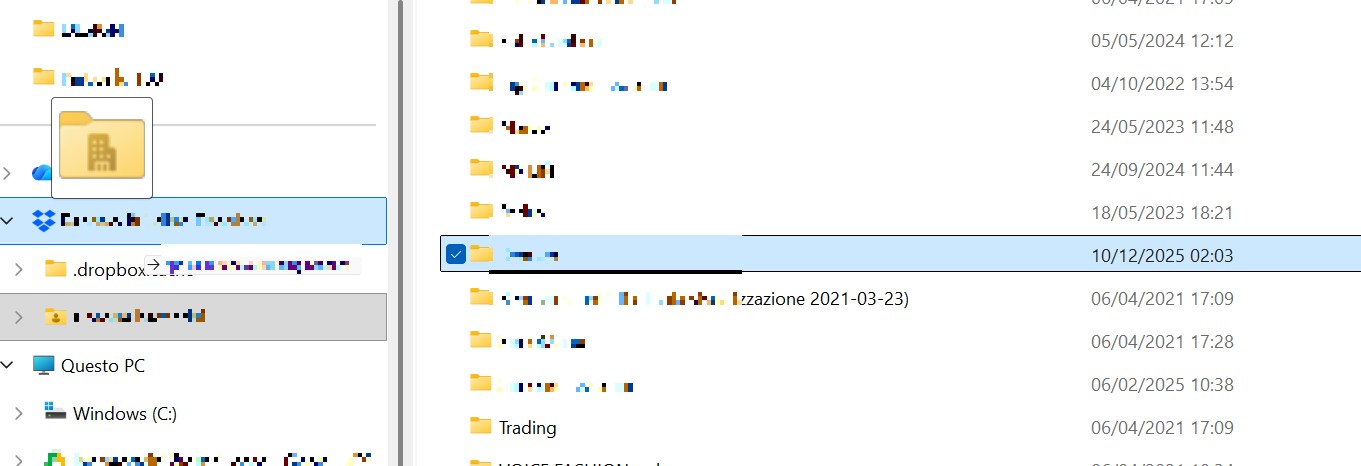
how can i fix?
4 Replies
- Jay2 months ago
Dropbox Community Moderator
Hi simonebecca, thanks for messaging the Community!
Did you recently join a Dropbox team, or did you move the folder into the different folder you're referring to?
Any other info or screenshots, while hiding any private names or details, would be helpful!
 simonebecca2 months agoExplorer | Level 3
hi jay,
i am the admin of renovo building dropbox, so i always had into the dropbox folder two folder:
Simone beccarini, personal folder of old dropbox
Renovo that arrive from dropbox business
Now i just accdentally moved the renovo folder into simone beccarini folder and i can't move back the folder
- Jay2 months ago
Can you try moving the folder back on the Dropbox site directly instead of via Explorer?
- Megan2 months ago
Hey simonebecca!
Just popping in to see if you've had a chance to look at our last message. Still need help? We're all ears! If the issue is sorted, let us know what worked out for you.


About Create, Upload, and Share
Find help to solve issues with creating, uploading, and sharing files and folders with Dropbox.
The Dropbox Community team is active from Monday to Friday. We try to respond to you as soon as we can, usually within 2 hours.
If you need more help you can view your support options (expected response time for an email or ticket is 24 hours), or contact us on X, Facebook or Instagram.
For more info on available support options for your Dropbox plan, see this article.
If you found the answer to your question in this Community thread, please 'like' the post to say thanks and to let us know it was useful!


