Need to see if your shared folder is taking up space on your dropbox 👨💻? Find out how to check here.
Forum Discussion

batilly84
5 years agoExplorer | Level 4
Right click menu missing (Mac OS)
Hello,
Thought I would reach out to you directly with a problem that I don't see the specific solution to.
My right click menu suddenly disappeared today while working on files in a Drop...
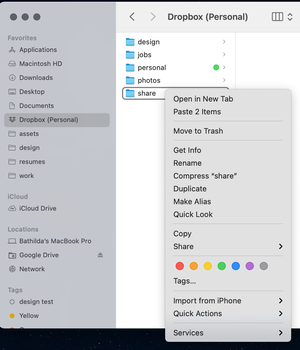

danbett
4 years agoHelpful | Level 7
Hi Dropbox/Megan, would anyone care to reply to our concerns or is that too much to ask? Hope to hear from you soon
regards
Dan B

Megan Dropbox Community Moderator
4 years agoDropbox Community ModeratorHi all! I hope you're doing well!
It is indeed not possible to share files from the backup folder any more. That happened, in order to ensure the security of your files, as a lot of people have very personal files saved there.
I do understand your frustration and I will definitely pass your comments along to our team.
Now, if you experience this behavior with paths outside of the backup folder, can you try opening a ticket with our Support team, in order for them to have a closer look into this?
Provided you face trouble doing so, let me know and I'll jump in to help.
Thank you!
- danbett4 years agoHelpful | Level 7
So if I stop backing up my computer, can I save my whole desktop and documents on dropbox so I can get this back, also why does dropbox not give any advance warning of this and why can we not choose, I don't feel that you have answered any questions here at all or provided any help or work around. And no, we are not doing well I suspect, I think we are all a little bit angry...
I ask again, please will you give us some real help and not fob us off, if you don't want to help any more then please provide a clear escalation path to this problem to someone who can actually help.
regards
Dan B
P.s I am not venting and I really don't want to be writing these emails, I just want the service that I signed up for and pay for and for it not be to radically altered with no warning and no consent
- Hannah4 years ago
Hey danbett, sorry to jump in.
We do understand where you're coming from and your comments will definitely be passed along to the team.
Regarding a workaround, you can either disable backup, or move/copy the files you want to share to a different location in your Dropbox folder.
That way, you'll be able to share them as normal.
 JeffSimpson9114 years agoNew member | Level 2
Looks like its time to move to Google Drive =(
- danbett4 years agoHelpful | Level 7
I just posted on another forum (the beta build) but the send with transfer option seems to have returned.....:). I hope this is a permanent return, if so then thankyou Dropbox for listening, it has stopped me from looking for an alternative. Please would you confirm that this is a permanent restoration of this much loved feature
best regards
Dan
- danbett4 years agoHelpful | Level 7
Oh my God, it's disappeared again...............what on earth is going on. There seems to be features dropping in and out every week. Please answer this and please fix this it is absolutely ludicrous and unprofessional.
- Megan4 years ago
Hi danbett, let's jump right into this!
Have you tried uninstalling, and re-installing the app by any chance? Is it up to date while we speak?
- danbett4 years agoHelpful | Level 7
Hi Megan,
I have uninstalled and re-installed the application and am running the latest version 153.3.3924.arm64.
The send with transfer option worked last week from my desktop but does not this week, I really should have taken a screen shot of the version number but the screen shot was taken on the 4th of July so maybe you can work out what the current version number was then. Has the 'Send with Transfer' feature been re-enabled ? or was this just an error. As before I really hope it has been re-enabled, please let me know. I re-enclose the two screenshots showing the differing options. As you can see I uninstalled Sync as I thought Dropbox had fixed the issue...
hope to hear from you soon with Good News
best regards
Dan
- danbett4 years agoHelpful | Level 7
His Walter
Thankyou for clearing this up, has this feature come back permanently and if so absolutely great as this has been crucial to my workflow over the years
For me part of the issue is features appearing and disappearing with no clear release notes so we do not know if it is a bug etc.. even the return of this item (please let it be permanent...) was not clear.
Thankyou again Dropbox for bringing this back, being able to backup my files and share them easily is a must for me
best regards
Dan
- Walter4 years ago
Thanks for your feedback on this and I'm glad to hear this helped, Dan.
See you around the Community and take care!
- be-each4 years agoHelpful | Level 6
Hi all,
R-click options for Dropbox missing after a Mac OS update is common. Dropbox Extensions need to be re-enabled in your mac System Settings.
Just open the System Settings and search for Extension >> Finder Extensions and click on Added Extensions.
Then under Dropbox make sure that the checkboxes for Finder extensions and for Sharing are checked.
 TRC1173 years agoExplorer | Level 4
Any updates with this?
Extensions have both DropBox items checked.
We're on the latest version of DropBox and we're on Ventura 13.2.
- Walter3 years ago
Hey TRC117, sorry to hear you're having issues with this.
Could you please send us a screenshot of the options you get when you right click on files in your Dropbox folder and another one of the app's exact status and version as shown in your menu bar?
This would help us assist further.
- TRC1173 years agoExplorer | Level 4
We're convinced at this point that we may need to go ahead and uninstall/reinstall, but I'd like to rule out all possibilities before doing so.
Things we know:
All Privacy & Security options with DropBox in them are enabled
Extensions in Privacy & Security are enabled as well as Sharing with DropBox Transfer enabled. - TRC1173 years agoExplorer | Level 4
Yes, DropBox does have Full Disk Access enabled.
- TRC1173 years agoExplorer | Level 4
I tried all suggestions.
We removed all security (malwarebytes and gatekeeper)
I removed the laptop from our MDM entirely so there's no security profiles or management.
There's no additional sync utililities (onedrive, google drive, etc).
The right-click menu did not give back the dropbox options.
We quit the Dropbox App then killed the dropbox finder extension in Activity Monitor then we tried to access the right-click menu again with no success. - TRC1173 years agoExplorer | Level 4
Thanks for the check-in!
I ended up putting in a ticket and the issue wasn't resolvable without some sort of re-install.
We ended up doing a sort of in-place upgrade/reinstall by downloading the dropbox app again and simply installing (without uninstalling the original).
This ended up repairing the issue for us.


About Create, upload, and share
Find help to solve issues with creating, uploading, and sharing files and folders in Dropbox. Get support and advice from the Dropbox Community.
The Dropbox Community team is active from Monday to Friday. We try to respond to you as soon as we can, usually within 2 hours.
If you need more help you can view your support options (expected response time for an email or ticket is 24 hours), or contact us on X, Facebook or Instagram.
For more info on available support options for your Dropbox plan, see this article.
If you found the answer to your question in this Community thread, please 'like' the post to say thanks and to let us know it was useful!


