Need to see if your shared folder is taking up space on your dropbox 👨💻? Find out how to check here.
Forum Discussion

batilly84
5 years agoExplorer | Level 4
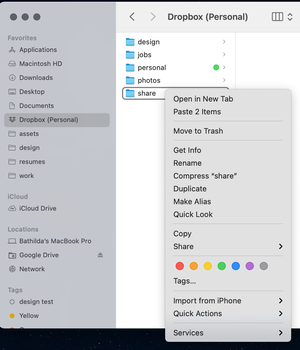
Right click menu missing (Mac OS)
Hello,
Thought I would reach out to you directly with a problem that I don't see the specific solution to.
My right click menu suddenly disappeared today while working on files in a Drop...

Walter Dropbox Community Moderator
4 years agoDropbox Community ModeratorThanks for your feedback on this and I'm glad to hear this helped, Dan.
See you around the Community and take care!

be-each
4 years agoHelpful | Level 6
Hi all,
R-click options for Dropbox missing after a Mac OS update is common. Dropbox Extensions need to be re-enabled in your mac System Settings.
Just open the System Settings and search for Extension >> Finder Extensions and click on Added Extensions.
Then under Dropbox make sure that the checkboxes for Finder extensions and for Sharing are checked.
 TRC1173 years agoExplorer | Level 4
Any updates with this?
Extensions have both DropBox items checked.
We're on the latest version of DropBox and we're on Ventura 13.2.
- Walter3 years ago
Hey TRC117, sorry to hear you're having issues with this.
Could you please send us a screenshot of the options you get when you right click on files in your Dropbox folder and another one of the app's exact status and version as shown in your menu bar?
This would help us assist further.
- TRC1173 years agoExplorer | Level 4
We're convinced at this point that we may need to go ahead and uninstall/reinstall, but I'd like to rule out all possibilities before doing so.
Things we know:
All Privacy & Security options with DropBox in them are enabled
Extensions in Privacy & Security are enabled as well as Sharing with DropBox Transfer enabled. - TRC1173 years agoExplorer | Level 4
Yes, DropBox does have Full Disk Access enabled.
- TRC1173 years agoExplorer | Level 4
I tried all suggestions.
We removed all security (malwarebytes and gatekeeper)
I removed the laptop from our MDM entirely so there's no security profiles or management.
There's no additional sync utililities (onedrive, google drive, etc).
The right-click menu did not give back the dropbox options.
We quit the Dropbox App then killed the dropbox finder extension in Activity Monitor then we tried to access the right-click menu again with no success. - TRC1173 years agoExplorer | Level 4
Thanks for the check-in!
I ended up putting in a ticket and the issue wasn't resolvable without some sort of re-install.
We ended up doing a sort of in-place upgrade/reinstall by downloading the dropbox app again and simply installing (without uninstalling the original).
This ended up repairing the issue for us.
About Create, upload, and share
Find help to solve issues with creating, uploading, and sharing files and folders in Dropbox. Get support and advice from the Dropbox Community.
The Dropbox Community team is active from Monday to Friday. We try to respond to you as soon as we can, usually within 2 hours.
If you need more help you can view your support options (expected response time for an email or ticket is 24 hours), or contact us on X, Facebook or Instagram.
For more info on available support options for your Dropbox plan, see this article.
If you found the answer to your question in this Community thread, please 'like' the post to say thanks and to let us know it was useful!


