Your workflow is unique 👨💻 - tell us how you use Dropbox here.
Forum Discussion

KarolisPoliksa
4 months agoHelpful | Level 5
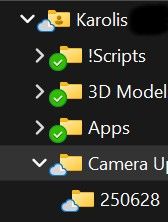
There's no distinct sync icon for folders containing both online-only and offline files on Win11.
Device (PC and Laptop) Operating System/Browser (if using the web) (Windows 11) Dropbox App Version 233.4.4938
After icon change I can't find a way to see if folder contains files that are bot...

Nancy Dropbox Community Moderator
4 months agoDropbox Community ModeratorThanks for posting here, KarolisPoliksa!
If a folder has a combination of online-only and available offline files/folders, then it’s expected to see the cloud icon next to the parent folder indeed (as mentioned here).
I've made sure to forward your feedback though to our team, so that they can take this into consideration, given how it can affect your workflow when working with many folders.
If you need something else, feel free to ping me.
About Create, Upload, and Share
Find help to solve issues with creating, uploading, and sharing files and folders with Dropbox.
The Dropbox Community team is active from Monday to Friday. We try to respond to you as soon as we can, usually within 2 hours.
If you need more help you can view your support options (expected response time for an email or ticket is 24 hours), or contact us on X, Facebook or Instagram.
For more info on available support options for your Dropbox plan, see this article.
If you found the answer to your question in this Community thread, please 'like' the post to say thanks and to let us know it was useful!


