Your workflow is unique 👨💻 - tell us how you use Dropbox here.
Forum Discussion

Agirres
5 years agoExplorer | Level 4
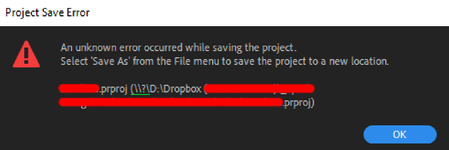
"Unknown Error" when saving an Adobe Premire Pro project directly into a Dropbox folder
I use Dropbox to store most of my files so I can share them easily, so I normaly create the projects directly on a Dropbox sync folder on my PC.
However, since some days ago, I have started get...
- 5 years ago
Thanks for the update Agirres.
In this case then, this might be caused by the syncing process when our app is running while you're also working on Adobe Premiere Pro.
Apart from quitting the app when working on your files through Adobe's Premiere Pro, you might also be able to work-around this issue by pausing the sync.
I know it's not much, but I sure hope this helps to some extent.
Please let me know if there's anything else I can assist with.


NexusMotion
4 years agoExplorer | Level 4
Absolutely. Plus when you pause the Dropbox it takes FOREVER to turn back on and give you right-click options again. And now dropbox has to be restarted like 10 times a day cause it just stops working and only acts like it's syncing. There's something terrible going on behind the scenes right now and they need to fix it. As someone who runs a business in quarantine using this paid service, it should work better than this. I've had this service for YEARS and it's getting more and more bloated.

DaveVeal
4 years agoExplorer | Level 4
Couldn't agree more. I totally forgot about the disappearing right click options i've been seeing in mac. Sporatically i've had to link out to the web browser versions of files just to generate a share link for a client email. Honestly considering other options because of these latest developments. But based upon the lack of concern from DB and their above "excitement" that pausing "solved" the OP's problem, they don't seem to be very concerned if at all.
- NexusMotion4 years agoExplorer | Level 4
Yep same here! Having to manually upload and link via the web because it takes too long for it to get up and running again. I'm on a $15,000 machine with 1gig internet. Shouldn't be that slow. This is by far not "SOLVED." Maybe we should all repost this issue so it doesn't come across as solved.
- DaveVeal4 years agoExplorer | Level 4
I was laughing just now thinking the same thing... "SOLVED"??!!! The solution is to LITERALLY stop using the product??? Then start using the product. LOLOL. I love customer service these days. Like that old joke... "Doctor... my arm hurts when I do this..."
About Create, Upload, and Share
Find help to solve issues with creating, uploading, and sharing files and folders with Dropbox.
The Dropbox Community team is active from Monday to Friday. We try to respond to you as soon as we can, usually within 2 hours.
If you need more help you can view your support options (expected response time for an email or ticket is 24 hours), or contact us on X, Facebook or Instagram.
For more info on available support options for your Dropbox plan, see this article.
If you found the answer to your question in this Community thread, please 'like' the post to say thanks and to let us know it was useful!


