Your workflow is unique 👨💻 - tell us how you use Dropbox here.
Forum Discussion

iKit
1 year agoExplorer | Level 4
Uploads skipped because ".docx format is not supported"?
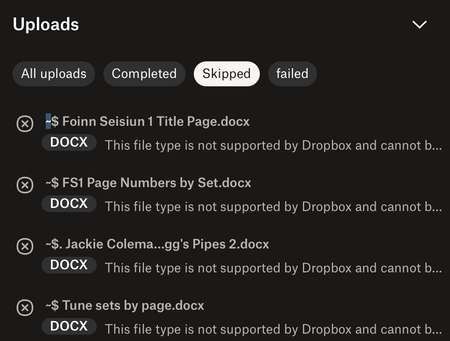
This issue – files not uploading because 'the format is not supported' – just started today. I made a new folder containing a large number of MP3 files, plus some MS Word documents that provide index...

Megan Dropbox Community Moderator
1 year agoDropbox Community ModeratorHey iKit, let's jump right into this!
Just to make sure we're on the same page here: did you receive this message upon copying these .docx files, that they already exist within your Dropbox account?
Have you tried a different browser, by any chance?
Let me know more, and we'll take it from there!

iKit
1 year agoExplorer | Level 4
Thanks for the reply.
No, I didn't get the message whilst copying the files, it was whilst I was uploading them. I downloaded them from Dropbox to my desktop first, because they were scattered across different locations and I wanted to make sure I'd assembled all the ones I needed to share.
Then I went to Dropbox online, made a new folder, and uploaded my files to it – from the desktop, not 'sideways' via the Dropbox website, or from the Dropbox location on my Mac. Nearly all of them uploaded normally, it was only the Word documents that were deemed unacceptable.
Given that I did it this way around, it's hard to see how a different browser would affect things?
It's 1:10am here now, so if you need further info, I'll send it tomorrow. Thanks again.
- Megan1 year ago
Thanks for the fast response iKit!
I believed you were using the website, hence the different browser question.
I'm not entirely sure if you used the desktop app, because you mentioned that you didn't use the "Dropbox location on your Mac" and that you went online, and uploaded your content.
Would you mind clarifying for me, please?
- iKit1 year agoExplorer | Level 4
I clicked the Dropbox icon in the task bar, and chose the option to go to Dropbox.com.
Once on the website, I made and named a new folder using 'Create Folder'. I was then presented with the zone where you can drop files for upload, and I dropped three new subfolders on it, to go inside this new folder. Most of the contents arrived there without difficulty, just not the Word documents.
(To be honest, I've no idea why I did it this way. I usually just add any new folders to the Dropbox location on my Mac, as it's much less clunky to create and reorganise stuff there than it is to do so on the website. But it's the middle of the night and I'm tired, and for some reason I chose the clunky method!)
Now I really do have to sleep...
- Nancy1 year ago
Hey iKit! Hope you’re doing great.
I see that the documents which can’t be uploaded have some symbols in front of their filename (~ $ .). Can you please try to rename couple of these files locally, while removing these symbols, and let me know if they still won’t upload?
When using a web browser, there are different parameters that may affect the functionality of a feature, so also using a different browser will help us understand if this could be a browser-related issue or if there’s something else going on here.
Let me know how this goes!

About Create, Upload, and Share
Find help to solve issues with creating, uploading, and sharing files and folders with Dropbox.
The Dropbox Community team is active from Monday to Friday. We try to respond to you as soon as we can, usually within 2 hours.
If you need more help you can view your support options (expected response time for an email or ticket is 24 hours), or contact us on X, Facebook or Instagram.
For more info on available support options for your Dropbox plan, see this article.
If you found the answer to your question in this Community thread, please 'like' the post to say thanks and to let us know it was useful!


