Your workflow is unique 👨💻 - tell us how you use Dropbox here.
Forum Discussion

iKit
1 year agoExplorer | Level 4
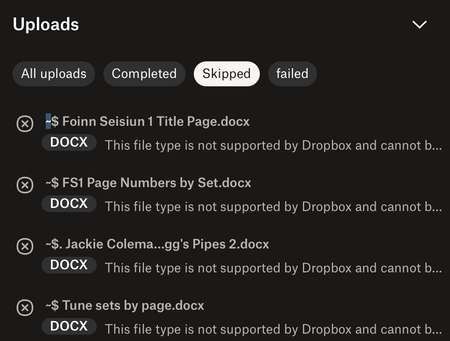
Uploads skipped because ".docx format is not supported"?
This issue – files not uploading because 'the format is not supported' – just started today. I made a new folder containing a large number of MP3 files, plus some MS Word documents that provide index...

iKit
1 year agoExplorer | Level 4
Thanks for the reply.
No, I didn't get the message whilst copying the files, it was whilst I was uploading them. I downloaded them from Dropbox to my desktop first, because they were scattered across different locations and I wanted to make sure I'd assembled all the ones I needed to share.
Then I went to Dropbox online, made a new folder, and uploaded my files to it – from the desktop, not 'sideways' via the Dropbox website, or from the Dropbox location on my Mac. Nearly all of them uploaded normally, it was only the Word documents that were deemed unacceptable.
Given that I did it this way around, it's hard to see how a different browser would affect things?
It's 1:10am here now, so if you need further info, I'll send it tomorrow. Thanks again.

Megan Dropbox Community Moderator
1 year agoDropbox Community ModeratorThanks for the fast response iKit!
I believed you were using the website, hence the different browser question.
I'm not entirely sure if you used the desktop app, because you mentioned that you didn't use the "Dropbox location on your Mac" and that you went online, and uploaded your content.
Would you mind clarifying for me, please?
- iKit1 year agoExplorer | Level 4
I clicked the Dropbox icon in the task bar, and chose the option to go to Dropbox.com.
Once on the website, I made and named a new folder using 'Create Folder'. I was then presented with the zone where you can drop files for upload, and I dropped three new subfolders on it, to go inside this new folder. Most of the contents arrived there without difficulty, just not the Word documents.
(To be honest, I've no idea why I did it this way. I usually just add any new folders to the Dropbox location on my Mac, as it's much less clunky to create and reorganise stuff there than it is to do so on the website. But it's the middle of the night and I'm tired, and for some reason I chose the clunky method!)
Now I really do have to sleep...
- Nancy1 year ago
Hey iKit! Hope you’re doing great.
I see that the documents which can’t be uploaded have some symbols in front of their filename (~ $ .). Can you please try to rename couple of these files locally, while removing these symbols, and let me know if they still won’t upload?
When using a web browser, there are different parameters that may affect the functionality of a feature, so also using a different browser will help us understand if this could be a browser-related issue or if there’s something else going on here.
Let me know how this goes!
- iKit1 year agoExplorer | Level 4
Thanks again for the reply.
I've checked this morning, and the .docx files have uploaded now. The puzzling thing is that they definitely don't exist anywhere with those symbols in the filenames – I've looked in the file tree and done a search of my laptop. Weird, but never mind.
Now there's a different issue, which has reappeared after being fixed a number of years ago. A lot of my files are set to be stored on my local drive, partly because I'm part of the support team for elderly relatives who don't have home broadband and live in rural areas with unreliable or no mobile signal. I have information about their medication and treatment history on my computer, and need to be able to access it if anything happens. The available offline setting is selected:
and new files I uploaded last night are included in the list for settings in Preferences/Selective Sync:
and yet when I check them on my local drive, they need to be downloaded manually:
This has been applied since last night to ALL my files, including the important medical ones.
It caused a worrying issue last time, when a locum doctor treating my 88-year-old aunt needed to whether she was on a particular medication before he could prescribe another. My aunt couldn't remember and none of us could find out; the doctor couldn't get a signal to access the surgery records, and all the data in my Dropbox had been removed from my laptop during the previous night. In this case it wasn't an emergency situation, but you can see how difficult it could have been. I really need to be sure files aren't removed while I'm not looking.
The Dropbox support agent didn't find out what caused it last time, and I don't know why it's started again. I haven't changed any of my preferences, but a couple of days ago I noticed that two newly created documents had unexpectedly been made online-only. At that point, everything else was fine; this morning everything has been removed, and needs to be downloaded again by the laborious process of clicking the cloud symbol next to each folder. I can't do it globally, because they're already set to be available offline.
Any ideas? Macs have a setting called Optimise Storage that allows users only to keep recently created/edited files locally, and I've checked that this hasn't been applied. I can't think of anything else, though. There's substantially more free space on my hard drive than there was when I looked last week, so the files have been removed.
Thanks!
- Kitty

About Create, Upload, and Share
Find help to solve issues with creating, uploading, and sharing files and folders with Dropbox.
The Dropbox Community team is active from Monday to Friday. We try to respond to you as soon as we can, usually within 2 hours.
If you need more help you can view your support options (expected response time for an email or ticket is 24 hours), or contact us on X, Facebook or Instagram.
For more info on available support options for your Dropbox plan, see this article.
If you found the answer to your question in this Community thread, please 'like' the post to say thanks and to let us know it was useful!


