Your workflow is unique 👨💻 - tell us how you use Dropbox here.
Forum Discussion

iKit
1 year agoExplorer | Level 4
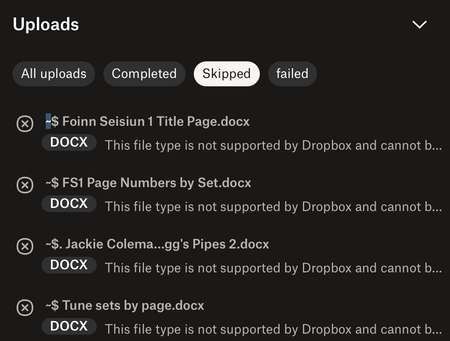
Uploads skipped because ".docx format is not supported"?
This issue – files not uploading because 'the format is not supported' – just started today. I made a new folder containing a large number of MP3 files, plus some MS Word documents that provide index...

Megan Dropbox Community Moderator
1 year agoDropbox Community ModeratorHey there, Kitty!
Based on the percentage you mentioned, it sounds highly possible that the app decided to automatically offload some items.
What you can do on your end, is probably change your music files to online-only, in order to free-up some hard drive space, and then change the status of any medical files, that you need to have available offline at all times.

iKit
1 year agoExplorer | Level 4
Thanks for that. I'll give it some thought, because quite obviously I couldn't keep the files I need for work offline on a long term basis – I work in places without internet access. I may need to move provider instead.
It's never been a problem before, and if it's deliberately been set up like that, it's disappointing. Why would anyone want to have to start not using some of their disk capacity, when previously they could?
Thanks again, though.
- Kitty
- Megan1 year ago
I definitely see where you're coming from! Your feedback regarding our Dropbox desktop application has been very valuable and I will endeavor to make sure your voice is heard.
Trust to know that I'll forward your feedback to the appropriate areas so we can continue to improve.
In any case, if you need to ask a question, or have any issues with the app or anything else Dropbox-related, just give us a shout!
About Create, Upload, and Share
Find help to solve issues with creating, uploading, and sharing files and folders with Dropbox.
The Dropbox Community team is active from Monday to Friday. We try to respond to you as soon as we can, usually within 2 hours.
If you need more help you can view your support options (expected response time for an email or ticket is 24 hours), or contact us on X, Facebook or Instagram.
For more info on available support options for your Dropbox plan, see this article.
If you found the answer to your question in this Community thread, please 'like' the post to say thanks and to let us know it was useful!


