Your workflow is unique 👨💻 - tell us how you use Dropbox here.
Forum Discussion

shutterbuggpro
9 months agoNew member | Level 2
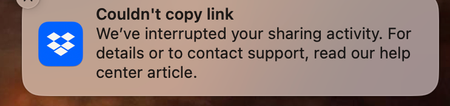
We've interrupted your sharing activity...
This just started happening yesterday when I was taking screenshots for an article. My screen capture utility is set up to save to my Dropbox. I read the help center article but it doesn't tell ...
 9 months ago
Hi Megan,
Thanks for checking in. The issue seems to have been resolved. I can now save screenshots to my Dropbox without getting the "couldn't copy link" message.
Thanks,
Michele
shutterbuggpro
9 months agoNew member | Level 2
Thanks for your reply.
I very much doubt that I have exceeded my bandwidth:
"Dropbox Basic: 20 GB of bandwidth and up to 100,000 file downloads per day."
I have no collaborators on most of my files and folders. I use Dropbox mainly to transfer files between my Windows PC and my MacBook Pro laptop. I get the sharing activity message ONLY when I take a screenshot on my MacBook Pro, which is configured to save screenshots to a dropbox folder.
I just tested sharing a file with someone, and it worked fine with no message. Unfortunately, getting this message every time I take a screenshot is not an acceptable workflow for me, so I have changed my settings to save my screenshots to Google Drive instead.
I'm thinking I don't need Dropbox at all. Maybe I'll use Box instead.
- Megan9 months ago
Dropbox Community Moderator
Hey shutterbuggpro, sorry to hear about that!
Just checking in with you, to see if you're still facing the same issue here, or if everything has now been resolved.
Keep me posted, and please double check if the issue remains when you take a screenshot, and I'll be happy to log a ticket on my end for you.
Thanks a bunch!

About Create, Upload, and Share
Find help to solve issues with creating, uploading, and sharing files and folders with Dropbox.
The Dropbox Community team is active from Monday to Friday. We try to respond to you as soon as we can, usually within 2 hours.
If you need more help you can view your support options (expected response time for an email or ticket is 24 hours), or contact us on X, Facebook or Instagram.
For more info on available support options for your Dropbox plan, see this article.
If you found the answer to your question in this Community thread, please 'like' the post to say thanks and to let us know it was useful!


