Your workflow is unique 👨💻 - tell us how you use Dropbox here.
Forum Discussion

Nick76
7 months agoHelpful | Level 6
Why do some folders have the syncing icon when nothing is syncing on Windows?
Hi everyone,
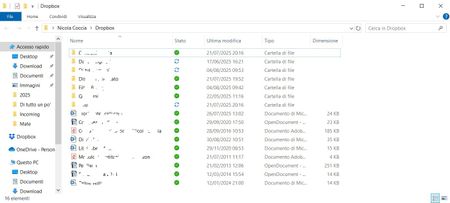
Since Dropbox updated the icon system, on my Huawei PC there are some folders that constantly show the two blue circular arrows, indicating continuous synchronization. This only happ...
 7 months ago
Never mind, everything has gone back to how it was before!! 😅😅😅

Jay Dropbox Community Moderator
7 months agoDropbox Community ModeratorHi Nick76, thanks for bringing this to our attention.
If the Dropbox desktop application states that everything is up to date, then this would mean that everything is synced normally overall.
Is it possible that you have some hidden files in those folders which could be accessed continuously by another app or service on your machine?
Keep me updated with any details!
Nick76
7 months agoHelpful | Level 6
Thank you very much for your reply! I’ve checked and there’s no hidden item, as you can see from the attached picture. It really remains quite a mystery. However, the important thing is that everything is synced. What you see in the screenshot are all the up-to-date files inside the folder that shows the continuous sync icon. As you can see, the "Hidden items" box is enabled.
- Walter7 months ago
Thanks for the additional information and the screenshot too Nick76
May I ask if those files were added to your Dropbox folder via copying or moving them from your desktop or if it was through the web? Can you move one file of those to your desktop and then back in to your Dropbox folder?
Did you try refreshing your window and rebooting your computer since you first noticed this? How about quitting and relaunching the app?
- Nick767 months agoHelpful | Level 6
Those files and folders have been there forever, for years, created right there on that PC. They never had any problems; the issues started when Dropbox, I believe, changed the status icon graphics. I had the same problem on another PC as well, but after two or three days everything went back to normal. On this PC, however, the problem doesn’t seem to resolve. I have done everything you suggested, and I also uninstalled and reinstalled the app, but nothing changed.
The only new thing I tried after reading your reply was to drag those folders out of Dropbox: they were copied to the desktop, and miraculously the icon returned to a green checkmark like it should!
What’s even stranger is that this technique worked with two out of three folders; with the third, there’s nothing to be done. But at this point, I’ll keep the files as they are, don’t worry — the important thing is that they are synced!!!
Thank you very much for the time you’ve dedicated to me!
Nicola

About Create, Upload, and Share
Find help to solve issues with creating, uploading, and sharing files and folders with Dropbox.
The Dropbox Community team is active from Monday to Friday. We try to respond to you as soon as we can, usually within 2 hours.
If you need more help you can view your support options (expected response time for an email or ticket is 24 hours), or contact us on X, Facebook or Instagram.
For more info on available support options for your Dropbox plan, see this article.
If you found the answer to your question in this Community thread, please 'like' the post to say thanks and to let us know it was useful!


