We’re Still Here to Help (Even Over the Holidays!) - find out more here.
Forum Discussion

DeepFilip
7 years agoNew member | Level 2
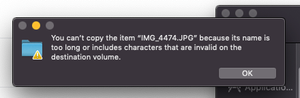
"You can't copy the item because its name is too" when copying a folder on my Mac.
Hi, I have a Dropbox account with 2TB of which 6% is full right now. I am trying to copy a folder that only has a couple of GBs and I am getting this error message. What is wrong with the filename "...
- 7 years agoHey there (DeepFilip), thanks for keeping the thread updated with the progress & apologies for getting back in touch with you with a slight delay. While this has been discussed here previously, I’d happily explain in a bit more depth under this conversation for posterity.It would be worth noting that there are files that your applications can't process correctly because they have file paths that are too long.This behavior is present if there are more than 255 characters in the entire file path. This means from the C:\ all the way to the extension of a file.As an example if you had a test.txt file in your Dropbox that had the following path:
C:\Users\YourName\My Documents\Dropbox\test.txtThis file would have a path that is 47 characters long.The Dropbox desktop application can read and write to locations that are longer than 255 characters, which means that files will sync to and from those locations, however, the applications used to open or save said files (e.g. Word, Notepad, Excel, &c.) might not support reading from or writing to these locations with long file paths and may show error messages when trying to open, save or edit them.Hopefully my message addresses your initial inquiry, however please feel free to check back with us here if you have any additional questions or thoughts!

Jane Dropbox Staff
7 years agoDropbox StaffHey AngelinaD, the filepath should count from your C:\ drive onwards. As you mentioned that you’ve been able to open these files normally at a certain point, it makes me wonder if you’ve moved these files across directories.
From what I gather from your description, I’d suspect an underlying syncing issue Lina; if it’s not too much trouble for you, can you confirm that this isn’t attributed to a missing desktop app update? Have you by any chance tried unlinking & relinking your account on your desktop once as a quick fix, since it recreates the local database? If you haven’t done so alreday, please do so whenever you find some spare time. Once you relink, you can refer to your overlay icons on your device to determine whether your files are syncing correctly :arrows_counterclockwise:/:white_check_mark:. From there, you can quickly upload a test file from you desktop & see if it's updating on our website?
Please do let us know how you get on with these steps on this discussion & we’ll do our best to check back with you. Thanks!
ldundercover
7 years agoNew member | Level 2
I had this problem, it happened after I upgraded to my OS to mojave and realized I needed to reinstalled the desktop app/ update dropbox. I had to copy files from my back up that didnt get synced that were recently added to local on my desktop dropbox. The files wouldnt copy becuase of the name character error (some which were very short actually) and already existed on my dropbox- I was needing to replace large folders
The work around was that I copied the files local then uploaded the folder via online rather then drag onto the desktop, but not super ideal for folders with very large files depending on internet connection.
About Create, upload, and share
Find help to solve issues with creating, uploading, and sharing files and folders in Dropbox. Get support and advice from the Dropbox Community.
The Dropbox Community team is active from Monday to Friday. We try to respond to you as soon as we can, usually within 2 hours.
If you need more help you can view your support options (expected response time for an email or ticket is 24 hours), or contact us on X, Facebook or Instagram.
For more info on available support options for your Dropbox plan, see this article.
If you found the answer to your question in this Community thread, please 'like' the post to say thanks and to let us know it was useful!


