We’re Still Here to Help (Even Over the Holidays!) - find out more here.
Forum Discussion

JayPeeGee303
12 months agoNew member | Level 1
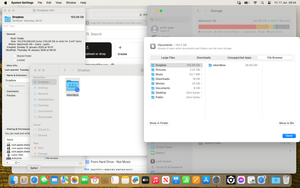
Dropbox folder on Mac is larger than it appears, why?
Hi
I'm quite new to this, so likely being a bit daft, but.........
I'm trying to manage storage space on my Mac to enable dropbox to sync. I'm currently seeing a dropbox error message..."Your har...
 12 months ago
Hi
I've just done safe start reboot and that appears to have resolved the issue.
Thanks
JayPeeGee303
12 months agoNew member | Level 1
Thanks for the quick reply.
Yes I did have a cache folder there, which I deleted to trash bin.
Not sure if this is meant to happen, but it quickly re appeared.
Size of Cache folder is only 56Mb
Original issue still exists.
Thanks
Justin
- Jay12 months ago
Dropbox Community Moderator
Are you able to right click that folder in the Dropbox folder itself to see the properties to see that size?
Do you have any files marked as online-only?

About Storage Space
Looking for help with managing the storage space in your Dropbox account? Talk to the Dropbox Community and get advice from members.
The Dropbox Community team is active from Monday to Friday. We try to respond to you as soon as we can, usually within 2 hours.
If you need more help you can view your support options (expected response time for an email or ticket is 24 hours), or contact us on X, Facebook or Instagram.
For more info on available support options for your Dropbox plan, see this article.
If you found the answer to your question in this Community thread, please 'like' the post to say thanks and to let us know it was useful!


