Need to see if your shared folder is taking up space on your dropbox 👨💻? Find out how to check here.
Forum Discussion

Dennis_Zuiderlicht
3 years agoHelpful | Level 6
Dropbox uses a ton of hard drive space despite most files being online only
So, I've put ALL my files on online-only because my Mac was running out of space.
In my Mac settings, Dropbox takes up 108 GB currently. Once I actually look at what folders are taking up space it'...
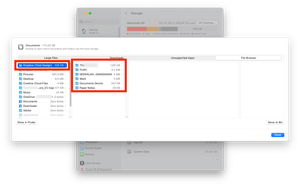
- 3 years ago
Is it possible that the hidden Dropbox cache folder is taking up space on your machine?
Try deleting the folder using these steps to see if this helps.


Nancy Dropbox Community Moderator
2 years agoDropbox Community ModeratorSorry to hear this, eroberts. Can you send us a couple of screenshots of what you see on your device (including the options you see when right-clicking on your Dropbox files and the size of the cache folder)?
I’d also like to know the syncing status and app version of your desktop app.

eroberts
2 years agoExplorer | Level 3
Hi Nancy,
Please see attached. It stopped syncing, informing me that the Dropbox is full and I need to clear files. I had tried clearing the cache several times and this didn't make sense at first because I was getting these messages but there weren't many files in the cache. On about the 5th time, I noticed some files were in the old_files folder and I cleared those and some space was freed up. However, the next day, it filled right back up again. I then checked the cache again and only 34.2 MB of space is being used. The old_files folder is also still empty.manage hard drive space - fulldropbox status even after running manage hard drive spaceno online only option on right clickmanage hard drive space - cleareddropbox versiondrive full even after running manage hard drive space
- Nancy2 years ago
Thanks for those screenshots! Now, if I got it right, it looks like both your Dropbox account and your hard drive are full.
Can you go here and send me one more screenshot of what you see?
If your Dropbox account is indeed full, the first step will be to either remove some files from your account online or get more Dropbox space to sync the extra files.
In any case, if your Dropbox account is full, then your Dropbox app won’t sync either, which may be the reason why you don’t see the online-only option.
Let me know if I misunderstood something though.
- eroberts2 years agoExplorer | Level 3
Hi Nancy,
Thanks for getting back to me. It's not that, we have a ton of space in the cloud. It has something to do with the sync function because it is literally downloading all of the files we have in Dropbox which I don't need on my desktop. This is simpler in OneDrive, because all I do is select online only or free up space and it frees up the space. I'm not sure why through Dropbox this is so much harder. It's especially confusing because it tells me it has successfully transferred the files online when it hasn't.Lots of space
- Megan2 years ago
Hey eroberts, let me also jump in here!
Would you be able to send me another screenshot of the Dropbox folder's properties, just to check what's going on there?
Also, when you access your folders inside the Dropbox folder, do you see any syncing icons there?

About Storage Space
Looking for help with managing the storage space in your Dropbox account? Talk to the Dropbox Community and get advice from members.
The Dropbox Community team is active from Monday to Friday. We try to respond to you as soon as we can, usually within 2 hours.
If you need more help you can view your support options (expected response time for an email or ticket is 24 hours), or contact us on X, Facebook or Instagram.
For more info on available support options for your Dropbox plan, see this article.
If you found the answer to your question in this Community thread, please 'like' the post to say thanks and to let us know it was useful!


