We’re Still Here to Help (Even Over the Holidays!) - find out more here.
Forum Discussion

Hannujar
2 years agoNew member | Level 2
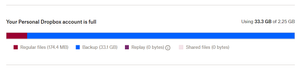
My account shows there are 33GB of backups, but my Backups page is empty.
Hello,
My account shows that it's out of storage, I have only 180MB in regular files and a 33GB backup, but I don't see it anywhere else than in the subscription page. Nothing on the backups pa...
 2 years ago
Hi Nancy,
I had already checked and there were no backups, but I just got the issue solved by logging out of the Dropbox desktop app, uninstalling and reinstalling it and then logging in again, now the mysterious backup is gone.

Megan Dropbox Community Moderator
2 years agoDropbox Community ModeratorHey Hannujar, welcome to our Community!
Interesting indeed. Just to double-check here: when you visit your Backup page online, it shows as entirely empty, right?
Would you mind sharing a screenshot with me, please?
Let me know more!
- Hannujar2 years agoNew member | Level 2
Hi Megan,
Yes, completely empty, screenshot below.
- Nancy2 years ago
Thanks for the screenshot, Hannujar! Are you still not seeing any backup files if you follow these steps?
- Hannujar2 years agoNew member | Level 2
Hi Nancy,
I had already checked and there were no backups, but I just got the issue solved by logging out of the Dropbox desktop app, uninstalling and reinstalling it and then logging in again, now the mysterious backup is gone.

About Storage Space
Looking for help with managing the storage space in your Dropbox account? Talk to the Dropbox Community and get advice from members.
The Dropbox Community team is active from Monday to Friday. We try to respond to you as soon as we can, usually within 2 hours.
If you need more help you can view your support options (expected response time for an email or ticket is 24 hours), or contact us on X, Facebook or Instagram.
For more info on available support options for your Dropbox plan, see this article.
If you found the answer to your question in this Community thread, please 'like' the post to say thanks and to let us know it was useful!


