Need to see if your shared folder is taking up space on your dropbox 👨💻? Find out how to check here.
Forum Discussion

karin57
3 years agoHelpful | Level 6
not enough storage?
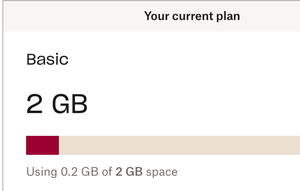
Although i have used 200 MB dropbox says that i am running out of storage. What could be the problem? I don't use backups.

karin57
3 years agoHelpful | Level 6
The person who shares the dropbox with me has just like me a free account.
How is it possible that she can open everything?
When you mentioned that you used another Dropbox account, and saw both folders, I'm not sure I got that one right. Can you explain and give me some more info, please?
That is right. I used a dropbox with my emailadress removed
and I also used one with removed
The shared folders were shared with both of the adresses. I could open both folders on [email removed as per Community Guidelines] but only 1 at [email removed as per Community Guidelines]
To find a solution I deleted the REMOVED dropbox and hoped that I than could open both folders at the other adress.

Megan Dropbox Community Moderator
3 years agoDropbox Community ModeratorSome Basic accounts could have more space due to either referrals, or promotions karin57.
That could explain the situation of the person sharing the folder with you. Also, did your steps work? Are you able to see the folders now?
- karin573 years agoHelpful | Level 6No unfortunately it didn’t help.
Is it possible to use 2 dropboxes?
So that I can open 1 folder in each dropbox?
About Storage Space
Looking for help with managing the storage space in your Dropbox account? Talk to the Dropbox Community and get advice from members.
The Dropbox Community team is active from Monday to Friday. We try to respond to you as soon as we can, usually within 2 hours.
If you need more help you can view your support options (expected response time for an email or ticket is 24 hours), or contact us on X, Facebook or Instagram.
For more info on available support options for your Dropbox plan, see this article.
If you found the answer to your question in this Community thread, please 'like' the post to say thanks and to let us know it was useful!


