We’re Still Here to Help (Even Over the Holidays!) - find out more here.
Forum Discussion

S10G
10 months agoNew member | Level 2
Why is my account full because of shared files?
Hello !
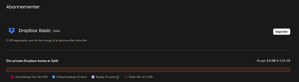
I have no files on my Dropbox Basic, but connected to 2.3 GB shared files. The shared files are not my files – someone else is paying a fee to store them on Dropbox. Is that an error that D...
- 10 months ago
S10G wrote:
I have no files on my Dropbox Basic, but connected to 2.3 GB shared files. The shared files are not my files – someone else is paying a fee to store them on Dropbox.
When you accept a shared folder, you get your own copy of the files in your account. Since the files exist in your account, they take up space like any other file.

Rich Super User II
10 months agoSuper User IIS10G wrote:I have no files on my Dropbox Basic, but connected to 2.3 GB shared files. The shared files are not my files – someone else is paying a fee to store them on Dropbox.
When you accept a shared folder, you get your own copy of the files in your account. Since the files exist in your account, they take up space like any other file.
 S10G10 months agoNew member | Level 2
Thanks!
- Theresa9 months ago
Community Manager
Hi S10G , and welcome to the Dropbox Community! 🎉
I’m glad to see that our amazing Super User, Rich, has given you some great advice on shared folders and why your storage has been taken up. 😊
I’m Theresa, a Community Manager here at Dropbox HQ, and I just wanted to check in, were you able to clear up your storage space? I hope everything’s sorted, but if not, here are the steps to remove yourself from a shared folder.
If you ever need more tips on how to make the most of Dropbox, tailored to your needs, don’t hesitate to reach out... I’m happy to help 🤗.
T 😺 (Dropbox Community Manager)

About Storage Space
Looking for help with managing the storage space in your Dropbox account? Talk to the Dropbox Community and get advice from members.
The Dropbox Community team is active from Monday to Friday. We try to respond to you as soon as we can, usually within 2 hours.
If you need more help you can view your support options (expected response time for an email or ticket is 24 hours), or contact us on X, Facebook or Instagram.
For more info on available support options for your Dropbox plan, see this article.
If you found the answer to your question in this Community thread, please 'like' the post to say thanks and to let us know it was useful!


