Need to see if your shared folder is taking up space on your dropbox 👨💻? Find out how to check here.
Forum Discussion

jkc-muc
2 years agoExplorer | Level 4
Can't sign into Dropbox desktop app on Mac OS Sequoia
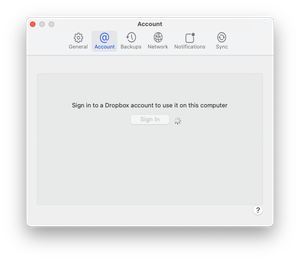
Hi - since upgrading to macOS Sequoia (version 15.0) I can no-longer use Dropbox on my Mac.
It works on my other devices and I can also login to the website.
I signed out then signed into Dro...
- 2 years ago
Hi jkc-muc ,
Thanks for reaching out.
Could you please try doing this:
- Look for search bar
- Then type terminal
- When the terminal windows opens:
- Type the following command
sudo /usr/libexec/ApplicationFirewall/socketfilterfw --add /Applications/Dropbox.app
It will ask you for the password of the Mac next
After this is done can you please see if the issue persists in the dropbox app ?
Can you please test this and get back to us?


jkc-muc
2 years agoExplorer | Level 4
Thank you Pedro,
Yes, that worked. My firewall went back to Dropbox accepting incoming connections and my symptoms have now gone.
I'm quite familiar with the Terminal but I suspect it would be quite disconcerting for a lot of Mac users.
Thank you to you and your colleagues.
John

Dominicus B.
2 years agoExplorer | Level 4
Hi to all
I had the same problem on my updated Mac osx sequoia.
I ended up checking the firewall settings and the update had ticked the setting "Block all incoming connections" (on top of all other settings/the first setting in the firewall). After unticking this I could make changes to OneDrive and Dropbox settings to allow incoming connections and this did it for me.
see pics of the settings
Sincerely/ Dominicus
- DBX_Pedro2 years ago
Community Manager
Hi Dominicus B. ,
Thanks for reaching out to us and providing a much easier alternative solution to the one I provided.
We appreciate this and will share this with other people in the community facing similar issues.
- jkc-muc2 years agoExplorer | Level 4
Hi Dominicus,
If you unblock all incoming connections does that present a security risk?
John
About Apps and Installations
Have a question about a Dropbox app or installation? Reach out to the Dropbox Community and get solutions, help, and advice from members.
The Dropbox Community team is active from Monday to Friday. We try to respond to you as soon as we can, usually within 2 hours.
If you need more help you can view your support options (expected response time for an email or ticket is 24 hours), or contact us on X, Facebook or Instagram.
For more info on available support options for your Dropbox plan, see this article.
If you found the answer to your question in this Community thread, please 'like' the post to say thanks and to let us know it was useful!


