Your workflow is unique 👨💻 - tell us how you use Dropbox here.
Forum Discussion

Mark G.16
2 years agoExplorer | Level 4
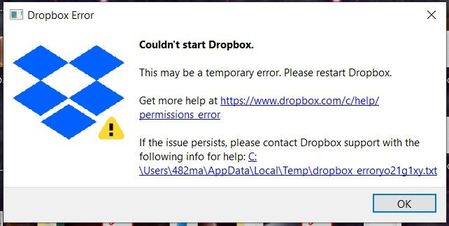
Desktop App won't start any more
My Desktop app will no longer start. I get this error window. The app still starts on my laptop, and the web version of dropbox works. I recently deleted some folders/files from my folder location to...
- 2 years ago
Hi jigsaw83, I checked, and it seems you were using a beta version of our app.
Can you try to switch to a stable one, and check how things go? You can do this by accessing your account settings on the Dropbox website and turn Early releases off.
Once that is done, feel free to re-install the app.


Walter Dropbox Community Moderator
2 years agoDropbox Community ModeratorHi all, for anyone who's still affected by this, could you let us know if you're running any 3rd party apps or security programs like antivirus or even a VPN/proxy setting on the affected computer?

Mark G.16
2 years agoExplorer | Level 4
No 3rd party apps or anti-virus type programs here...
- Megan2 years ago
Since the advanced re-install didn't solve this error, would it be okay for me to reach out via email, in order for us to have a closer look into this, Mark?
- Jay2 years ago
Hi everyone, could you confirm what version of Windows and OS build you're running on your machines?
 yutsunhsieh2 years agoExplorer | Level 4
Windows 10 22H2 OS Build 19045.3155
- Jay2 years ago
To look into this matter in more detail, could we contact you at the email associated with your forum profile?
- Mark G.162 years agoExplorer | Level 4
Yes
- yutsunhsieh2 years agoExplorer | Level 4
Yes
- Jay2 years ago
I've sent you an email, yutsunhsieh, please could you reply to it when you get a chance!

About Apps and Installations
Have a question about a Dropbox app or installation? Reach out to the Dropbox Community and get solutions, help, and advice from members.
The Dropbox Community team is active from Monday to Friday. We try to respond to you as soon as we can, usually within 2 hours.
If you need more help you can view your support options (expected response time for an email or ticket is 24 hours), or contact us on X, Facebook or Instagram.
For more info on available support options for your Dropbox plan, see this article.
If you found the answer to your question in this Community thread, please 'like' the post to say thanks and to let us know it was useful!


