Need to see if your shared folder is taking up space on your dropbox 👨💻? Find out how to check here.
Forum Discussion

suethomo
3 years agoExplorer | Level 3
Dropbox Backup partially backup, not updating.
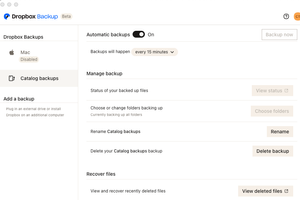
When I go to manage my backups the Mac is Disabled. I am backing up 3 folders from my computer hard drive. They are only partially backup and not updating. Screen shots to help explain.

Hannah Dropbox Community Moderator
3 years agoDropbox Community ModeratorHey suethomo, sorry to jump in here.
Can you try closing the Dropbox app and relaunching it from your applications folder, to see if that helps?
Make sure to also restart your computer.

suethomo
3 years agoExplorer | Level 3
Have tried doing as you suggested and launched from App folder. Also deleted and re-installed app.
About Apps and Installations
Have a question about a Dropbox app or installation? Reach out to the Dropbox Community and get solutions, help, and advice from members.
The Dropbox Community team is active from Monday to Friday. We try to respond to you as soon as we can, usually within 2 hours.
If you need more help you can view your support options (expected response time for an email or ticket is 24 hours), or contact us on X, Facebook or Instagram.
For more info on available support options for your Dropbox plan, see this article.
If you found the answer to your question in this Community thread, please 'like' the post to say thanks and to let us know it was useful!


