Need to see if your shared folder is taking up space on your dropbox 👨💻? Find out how to check here.
Forum Discussion

suethomo
3 years agoExplorer | Level 3
Dropbox Backup partially backup, not updating.
When I go to manage my backups the Mac is Disabled. I am backing up 3 folders from my computer hard drive. They are only partially backup and not updating. Screen shots to help explain.
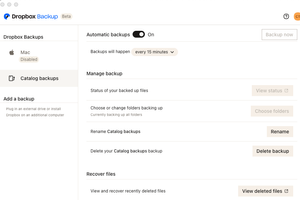

Nancy Dropbox Community Moderator
2 years agoDropbox Community ModeratorHey there! Yes, in my last post, I was referring to the screenshot you uploaded here.
Since the backup’s syncing status is different now, can you please give it couple more hours and let me know if it makes any progress/if you see any new content backed up that you couldn’t see before?

25glenmore
2 years agoExplorer | Level 4
Hi Nancy
Still only backed up about 74gb and status is everything is up to date, still half the content missing?
- Nancy2 years ago
Hmm, I see. Can you please check the files/folders of your external drive, and let me know if there’s something that doesn’t seem to be backed up to Dropbox?
I’d like to gather as much info as possible to investigate this further.
- 25glenmore2 years agoExplorer | Level 4
Morning Nancy.
Checked last night and lots of files missing, getting to my wits end with this now.
I thought if i just copied all the files from the hard drive to my desktop then i could just right click and backup to dropbox, as soon as i had done this i had the new folder appear in place on my desktop with the Ignore symbol? I deleted the backup and still cannot get the Folder "server5" on my desktop to backup.
Any suggestions? it has been so much easier in the years gone by.
Thanks
Alan
- Nancy2 years ago
Thanks for giving that a go, Alan.
If I get it right, you’re seeing this syncing icon next to the “Server-5” folder, correct?
If yes, I’d like you to follow these steps and let me know if it syncs now online.
- 25glenmore2 years agoExplorer | Level 4
Hi Nancy
I had a quick look at that earlier this morning and gave it a go but im obviously not amending it correctly as it is unrecognized command.
The syncing icon is against the new folder that dropbox placed on the desktop "Files on my Computer" my "Server-5" Folder is now inside this but still reachable via Server5\Desktop\Server-5 location.
Can you give me a more simple breakdown of the command line.
The location of my folder that i want to back up is "C:\Users\Server 5\Desktop\Server-5"
Thanks Again
Alan
- Nancy2 years ago
Thanks for giving that a go! In this case, I’d like you to open the "Server-5" folder within Desktop, and send me a screenshot of how it shows on your computer.
I’ll have a look and guide you from there.
- 25glenmore2 years agoExplorer | Level 4
Nancy
as requested
- Nancy2 years ago
Thanks Alan! From your screenshots, I don’t see see any icon suggesting that this folder is being ignored specifically.
However, I‘d like to make sure that computer backup has been set up properly (as I can see there’s a “My files in Dropbox” shortcut, which can indicate something’s not being backed up right.
Please send me two more screenshots of what you see on your Backups tab here and online here.
Finally, did you perform any reinstalls of the Dropbox app in the meantime?
- 25glenmore2 years agoExplorer | Level 4
Nancy
The Ignore Icon is on the "My Files in Dropbox" folder that dropbox placed on my desktop and moved "Server-5" Folder inside it. that seems to be the issue how do i remove the Ignore icon from the "My Files in Dropbox" folder?
See folder Top left of the screen grab below.
- Jay2 years ago
Hi 25glenmore, at this point, I'd recommend contacting the support team directly so that they can assist you with more account and device-specific information.

About Apps and Installations
Have a question about a Dropbox app or installation? Reach out to the Dropbox Community and get solutions, help, and advice from members.
The Dropbox Community team is active from Monday to Friday. We try to respond to you as soon as we can, usually within 2 hours.
If you need more help you can view your support options (expected response time for an email or ticket is 24 hours), or contact us on X, Facebook or Instagram.
For more info on available support options for your Dropbox plan, see this article.
If you found the answer to your question in this Community thread, please 'like' the post to say thanks and to let us know it was useful!


