Need to see if your shared folder is taking up space on your dropbox 👨💻? Find out how to check here.
Forum Discussion

GGBin Mich
3 years agoHelpful | Level 5
How to find which files are online-only, and stop the notification?
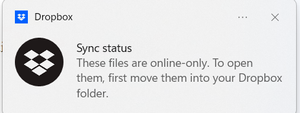
How do I find the files in Dropbox files that are causing this annoying synch alert to popup dozens of times a day? The list of icons was not helpful.

Rich Super User II
3 years agoSuper User II
GGBin Mich wrote:
How do I find the files in Dropbox files that are causing this annoying synch alert to popup dozens of times a day?
Files that are Online-only will have a grey circle with a white cloud on their icon if you're on Windows or Linux, or a cloud outline with a down arrow if you're on a Mac. That's the only way to identify which files are marked as Online-only.
 GGBin Mich3 years agoHelpful | Level 5
Thank you - very helpful to identify the items.
Can I do a global update or do I have to save each picture or file to my Window 11 PC?
About Apps and Installations
Have a question about a Dropbox app or installation? Reach out to the Dropbox Community and get solutions, help, and advice from members.
The Dropbox Community team is active from Monday to Friday. We try to respond to you as soon as we can, usually within 2 hours.
If you need more help you can view your support options (expected response time for an email or ticket is 24 hours), or contact us on X, Facebook or Instagram.
For more info on available support options for your Dropbox plan, see this article.
If you found the answer to your question in this Community thread, please 'like' the post to say thanks and to let us know it was useful!


