Your workflow is unique 👨💻 - tell us how you use Dropbox here.
Forum Discussion

WillHermann
6 years agoExplorer | Level 3
Hundreds of background processes, new windows opened
Dropbox seems to be stuck in a loop, and opening hundreds of background processes. This consumes all my CPU capacity, then eats at my memory and disk space. See attached pics. There also seem to be w...
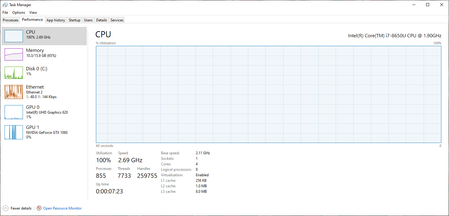
- 6 years ago
I appear to have resolved this, by uninstalling, removing my local dropbox folder and re-installing (and allowing the subsequent download). Now I only see 4 Dropbox related processes, and system performance is normal.
It appears that the issue was actually related to firewall changes in my network. Apparently Dropbox was spawning processes that would then wind up waiting indefinitely, instead of completing and exiting. Apparently there is no check for system load, number of child processes, etc. And the question remains as to why the Dropbox servers are now showing up on my block list.
While this fix worked for me, if folks have a significant amount of data in their Dropbox, they may be more reluctant to try it.

Minas S.
6 years agoExplorer | Level 4
I have the exact same problem. It all started after the update of 26.01.2020.
Instead of having us trying random things (I refer to the article that you pointed above) and telling us to restart, just admit that dropbox **bleep**ed up completly with the latest update and have cost us quite a few human hours already.
I can confirm that after uninstalling dropbox I managed to regain control of my computer and finish some urgent work that i needed done, but apparently that means I have no longer the auto-sync from my hard disk.
Please solve the problem and post the solution. I am fairly sure it must be quite widespread!
Thank you in advance.
UnableToUse
6 years agoHelpful | Level 6
I have the identical problem. Hundreds of Dropbox processes, chewing up all available memory, CPU, and disk cycles.
No tray icon to shut them down, and system too un-responsive to manually stop each of the multitudes of processes.
I uninstalled Dropbox as well. I'll be waiting to hear of a fix before I re-install - or if it takes too long, I'll switch to an alternative service.
- Lusil6 years ago
Dropbox Staff
Hey Minas S. and UnableToUse, thanks for nudging us on this thread and sorry to hear that you're also having trouble with high CPU/RAM usage.
I'd be more than happy to help look into this with you, and to ensure that I have a better visual of what you're seeing, could you send me a screenshot (without any personal info) of your Task Manager (Windows) or Activity Monitor (Mac) showing these processes?
Keep me posted!
- UnableToUse6 years agoHelpful | Level 6
Having un-installed Dropbox so I can actually use my computer, I no longer can generate the desired images, sorry.
I can share the method I used to make my computer responsive enough to un-install Dropbox:
PowerShell> Stop-Process -name "Dropbox"
I really hope you can fix this, as I'd prefer not to have to migrate to another service (with all of my family and all of our devices).
- Lusil6 years ago
Thanks for your swift reply, UnableToUse.
I'd be more than happy to send you a ticket so as to have a better look into this with you, if you'd like.
Just give me a shout and I'll make sure to get back to you as soon as possible. Cheers!
- Pierre386 years agoNew member | Level 2Same problem for me. Hundreds of processes launch, and provoked a disk failure. Now I have to pay to recover all my working files. Had to uninstall it. Please fix it quiclky
- UnableToUse6 years agoHelpful | Level 6
I appear to have resolved this, by uninstalling, removing my local dropbox folder and re-installing (and allowing the subsequent download). Now I only see 4 Dropbox related processes, and system performance is normal.
It appears that the issue was actually related to firewall changes in my network. Apparently Dropbox was spawning processes that would then wind up waiting indefinitely, instead of completing and exiting. Apparently there is no check for system load, number of child processes, etc. And the question remains as to why the Dropbox servers are now showing up on my block list.
While this fix worked for me, if folks have a significant amount of data in their Dropbox, they may be more reluctant to try it.
- Minas S.6 years agoExplorer | Level 4Dear Lusil,
since I have uninstalled Dropbox I cannot send you any image right now.
It took me quite a bit of time to manage to uninstall Dropbox (since my computer was becoming unresponsive) and hence will not take the risk to install it again until a patch for this bug is posted.
As other users have said it is impossible to stop the processes (I finally did a safe mode logging and uninstalled it).
In my computer I could have up to 2000-3000 Dropbox process running in parallel before becoming completely unresponsive.
I don’t want to delete my folder and reinstall as I have quite a few files (and selective sync) and it would take me a long time .
Please help. - WillHermann6 years agoExplorer | Level 3
I uninstalled Dropbox, deleted all associated files, and re-installed with severe restrictions on which files even smart sync to my computer. 30 minutes after those files are indexed, and I haven't seen any odd jumps in activity.
After Dropbox said it probably wasn't them (Also, since the desktop app isn't running when you experience high CPU, the cause could be related to an external factor, such as a third party app (for example, I can see that you're running a few that show up at the very top of the list under Power usage). For this reason, I'd recommend looking into other third party apps that could be causing this.) I went to a Microsoft store's help desk to see if they had any ideas, and they advised me to re-install windows 10, which I found even less helpful. I'm thankful for other users who had less trepidation about being drastic with the program and their files. Would have taken a lot longer to re-install the OS.
What was especially odd is that other members of my team that have access to many of the same files I do, and have not experienced the same issues. I had access to a computer from someone leaving our team recently, and was able to use dropbox on that computer fine. All the programs installed are the same on both computers, but I only had the issue on the one. I would guess that some security setting was messing with Dropbox, or that there is a conflict between competing updates. Hopefully it doesn't happen again...
- Minas S.6 years agoExplorer | Level 4
Reinstalled dropbox and now, even if with "smart" sync disabled dropbox "syncronizes" all files in my computer (99.999% of them are the same with my cloud backup but that doesnot seem to matter).
I had to unsistall it again to prevent the huge download/upload operation.
Basically dropbox is behaving like a virus. In my case there was absolutely no other app involved.
Is it possible to get a refund (I just update my subscription a month ago) and terminate my subscription? It is just not worth the trouble any more!
Thank you very much in advance.
- Lusil6 years ago
Hey Minas S. - thanks for nudging us on this thread and sorry to hear about your frustration.
I'd be more than happy to help look into this with you a bit more in depth, so I've sent you a ticket. When you have the chance, please check your inbox for my latest message and we'll take it from there.
Looking forward to hearing back from you!
- StuBell5 years agoNew member | Level 2
Hi
I have the same problem - no tray icon - multiple processes, but I have the added issue of not being able uninstall dropbox!
What's the next step?
- Lusil5 years ago
Hey StuBell, thanks for reaching out to us and sorry to hear that you're having trouble uninstalling the desktop app.
Since you mention that you have a lot of processes running in the background, could you follow the steps below:
- Open your Task Manager.
- Go to the Processes tab (you may need to click on "Show processes from all users" to check all processes).
- If you find items that refer to Dropbox or apps that you've linked to Dropbox, click on them and select End Process.
- Once you've done this, try following the uninstall instructions one more time.
Let me know how it goes and I'll make sure to get back to you as soon as possible. Thanks!
- StuBell5 years agoNew member | Level 2Hi.
Tried but there were too many and the computer was to slow to do even this.
So booted into safe mode and was then able to complete the uninstall process.
Computer is working like dream again!
Will get around to reinstalling sometime.
Thanks for getting back to me
Stay safe
Stuart  mpoling5 years agoExplorer | Level 3
Same exact problem. I'm not going through beta testing your update. It happened IMMEDIATELY after your last software update, so let's not go to the "third party" blame game. It's your error. I'm already prepping to move to another service if you can't admit it and fix it.
I've uninstalled the app, reinstalled. I've looked at my anti-virus, but if Dropbox can't work with a large vendor like BitDefender, then Antivirus trumps Dropbox....
Mike Poling
- Minas S.5 years agoExplorer | Level 4Hi Mike,
You are right it is definitely a Dropbox problem - something to do with the last couple of updates. I also had the same problem and also have bitdefender installed, so it might also have to do with the interaction.
Good news is that after removing and reinstalling Dropbox a couple of times (without having to remove the Dropbox folder as others have said) it somehow worked as before.
Hopefully it will work for you too.  fido1235 years agoNew member | Level 2
Same issues with my dropbox. Just started happening last week.
 DeanPavlakis5 years agoNew member | Level 2
This same problem happened to me starting two days ago, spawning hundreds of processes within about 30 minutes. I rebooted a bunch of times, same thing. I tried uninstalling, but can't - once the processes have spawned, there are too many to "stop" or "end" - but I was able to "end task" right after rebooting and uninstall. I reinstalled and the same problem again. It uses 100% of my disk space and almost 100% of my memory, making my computer useless. If a solution is found, I'd really like to know.
- mpoling5 years agoExplorer | Level 3
My solution was to move from Dropbox to Google Drive. Problem solved and uploads are much faster

About Apps and Installations
Have a question about a Dropbox app or installation? Reach out to the Dropbox Community and get solutions, help, and advice from members.
The Dropbox Community team is active from Monday to Friday. We try to respond to you as soon as we can, usually within 2 hours.
If you need more help you can view your support options (expected response time for an email or ticket is 24 hours), or contact us on X, Facebook or Instagram.
For more info on available support options for your Dropbox plan, see this article.
If you found the answer to your question in this Community thread, please 'like' the post to say thanks and to let us know it was useful!


