Your workflow is unique 👨💻 - tell us how you use Dropbox here.
Forum Discussion

WillHermann
6 years agoExplorer | Level 3
Hundreds of background processes, new windows opened
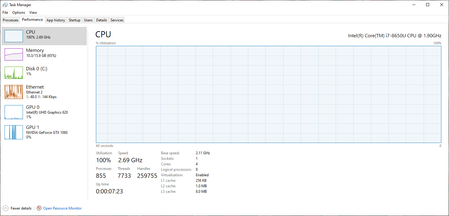
Dropbox seems to be stuck in a loop, and opening hundreds of background processes. This consumes all my CPU capacity, then eats at my memory and disk space. See attached pics. There also seem to be w...
- 6 years ago
I appear to have resolved this, by uninstalling, removing my local dropbox folder and re-installing (and allowing the subsequent download). Now I only see 4 Dropbox related processes, and system performance is normal.
It appears that the issue was actually related to firewall changes in my network. Apparently Dropbox was spawning processes that would then wind up waiting indefinitely, instead of completing and exiting. Apparently there is no check for system load, number of child processes, etc. And the question remains as to why the Dropbox servers are now showing up on my block list.
While this fix worked for me, if folks have a significant amount of data in their Dropbox, they may be more reluctant to try it.

Minas S.
5 years agoExplorer | Level 4
Hi Mike,
You are right it is definitely a Dropbox problem - something to do with the last couple of updates. I also had the same problem and also have bitdefender installed, so it might also have to do with the interaction.
Good news is that after removing and reinstalling Dropbox a couple of times (without having to remove the Dropbox folder as others have said) it somehow worked as before.
Hopefully it will work for you too.
You are right it is definitely a Dropbox problem - something to do with the last couple of updates. I also had the same problem and also have bitdefender installed, so it might also have to do with the interaction.
Good news is that after removing and reinstalling Dropbox a couple of times (without having to remove the Dropbox folder as others have said) it somehow worked as before.
Hopefully it will work for you too.

fido123
5 years agoNew member | Level 2
Same issues with my dropbox. Just started happening last week.
 DeanPavlakis5 years agoNew member | Level 2
This same problem happened to me starting two days ago, spawning hundreds of processes within about 30 minutes. I rebooted a bunch of times, same thing. I tried uninstalling, but can't - once the processes have spawned, there are too many to "stop" or "end" - but I was able to "end task" right after rebooting and uninstall. I reinstalled and the same problem again. It uses 100% of my disk space and almost 100% of my memory, making my computer useless. If a solution is found, I'd really like to know.
 mpoling5 years agoExplorer | Level 3
My solution was to move from Dropbox to Google Drive. Problem solved and uploads are much faster
About Apps and Installations
Have a question about a Dropbox app or installation? Reach out to the Dropbox Community and get solutions, help, and advice from members.
The Dropbox Community team is active from Monday to Friday. We try to respond to you as soon as we can, usually within 2 hours.
If you need more help you can view your support options (expected response time for an email or ticket is 24 hours), or contact us on X, Facebook or Instagram.
For more info on available support options for your Dropbox plan, see this article.
If you found the answer to your question in this Community thread, please 'like' the post to say thanks and to let us know it was useful!


